





ガイド
Migrating your assets: Browser Extension v2.68 Security Incident
投稿をシェア
概要
Learn how to use the asset migration tool, and get support if your wallet was affected by a previous security incident.

We identified a security incident affecting the Trust Wallet Browser Extension version 2.68 between December 24-26, 2025. If your wallet was exposed during this time frame, your wallet may be compromised.
As a result, we’ve created a migration tool that will help you move your assets from a compromised wallet to a safe wallet.
Based on our investigation, this security incident affects:
Only Trust Wallet Browser Extension version 2.68 users who opened the extension and logged in during the affected period
It does not affect:
Any Trust Wallet mobile app users
Users on any other browser extension versions
Browser Extension v2.68 users who opened and logged in after December 26, 2025 at 11:00 UTC.
What actions should I take?
There are two critical actions to take.
First, if you have funds in an affected wallet, migrate your funds immediately to a new wallet. Use built-in migration tool outlined below to migrate your funds.
Next, abandon use of the affected wallet, even if there is no balance. It is critical that you stop use of the affected wallet to avoid potential loss.
Please follow the steps below immediately migrate your funds.
If using the Trust Wallet Browser Extension here’s how to migrate your assets using the built-in migration tool
First, make sure you’re using the most updated version of Trust Wallet.
Open your wallet and select the Migrate assets button.
Select a wallet that is labelled “Compromised” and then select all assets to migrate.
Select the Migrate button.
On the “Migrate to” screen, select where you want to transfer assets. This could be another wallet that is safe and not compromised, or you could create a wallet using the “Create new wallet” button.
Complete the remaining steps.
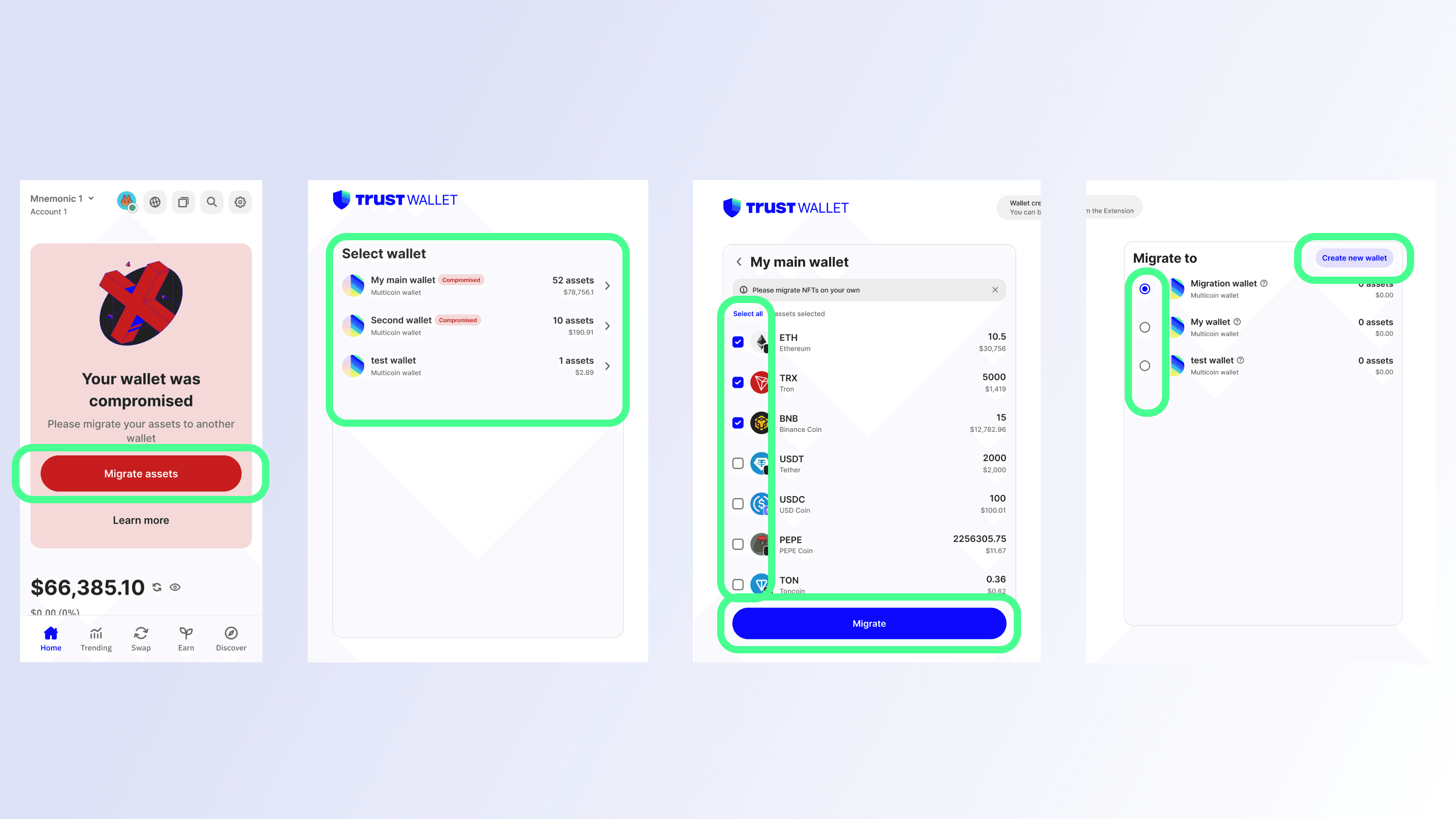
Security note: Please ensure to complete the migration process for each wallet that is labelled “Compromised”.
If using the Trust Wallet mobile app here’s how to migrate your assets using the built-in migration tool
First, make sure you’re using the most updated version of Trust Wallet.
Open your wallet and select the Migrate assets button. Alternatively, you can navigate to the migrate feature by going to “Settings” (gear symbol at top left)→“Security”→”Migrate assets”.
Select a wallet that is labelled “Compromised” and then select all assets to migrate.
Select the Migrate button.
On the “Migrate to” screen, select where you want to transfer assets. This could be another wallet that is safe and not compromised, or you could create a wallet using the “Create new wallet” button.
Complete the remaining steps.
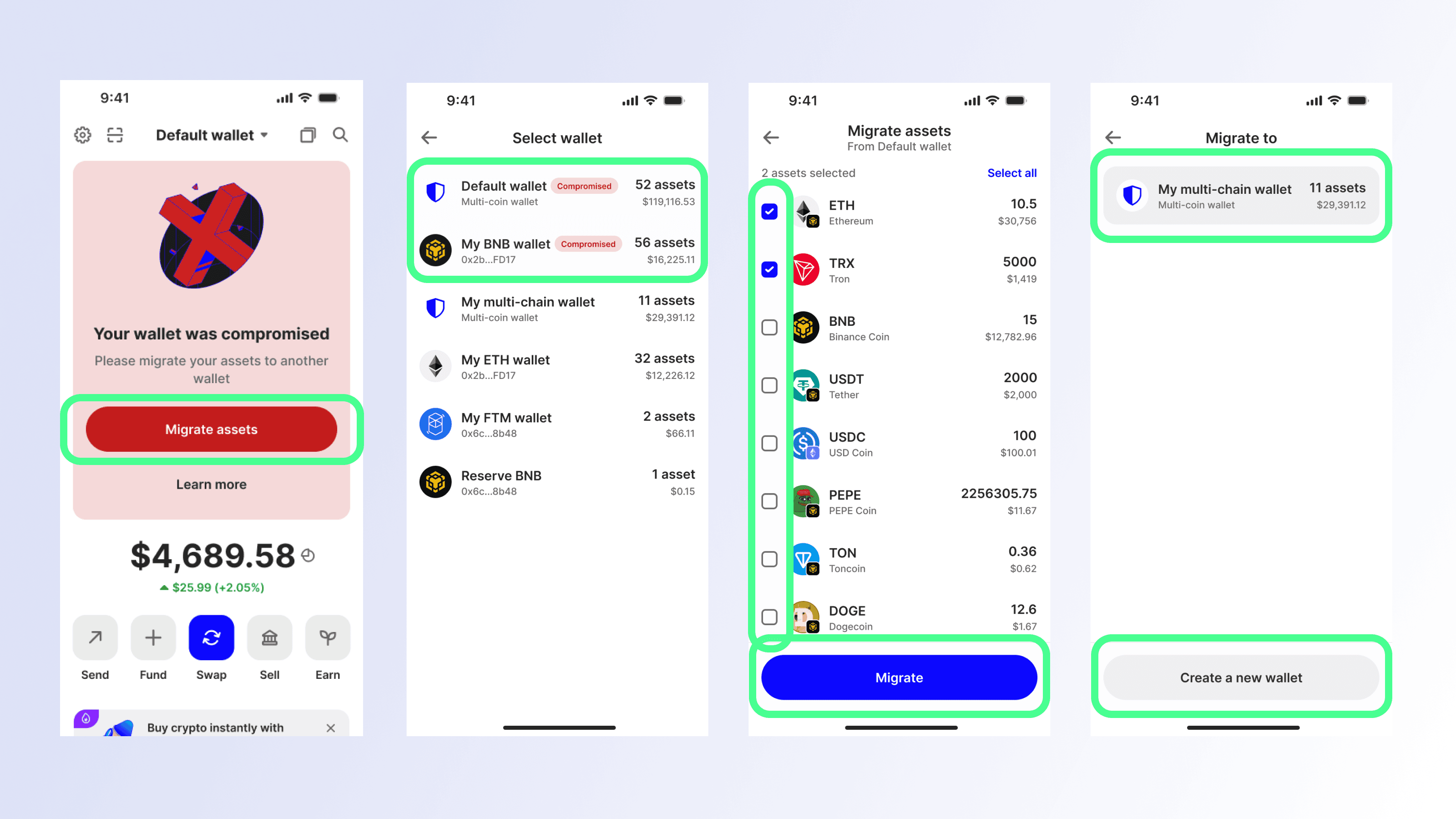
Security note: Please ensure to complete the migration process for each wallet that is labelled “Compromised”.
Frequently Asked Questions
Who was affected by this incident?
Based on our investigation, this security incident affects:
Only Trust Wallet Browser Extension version 2.68 users who opened the extension and logged in during the affected period
It does not affect:
Any Trust Wallet mobile app users
Users on any other browser extension versions
Browser Extension v2.68 users who opened and logged in after December 26, 2025 at 11:00 UTC.
Was the Trust Wallet mobile app affected?
No. The incident was limited to Browser Extension version 2.68 only.
How much was impacted?
Preliminary finding suggests approximately $8.5 million impacted. Our investigation and monitoring is ongoing and the numbers may change.
Was this a supply-chain issue?
The issue has been isolated to Browser Extension version 2.68. Our security and engineering teams are continuing to assess the technical root cause.
Where can affected users get help?
We are doing our best to reimburse incident victims. To start the reimbursement process, affected users should please complete this form
https://be-support.trustwallet.com to help us process your case.