



BLOG_PAGE.section-article.category.academy
How to Swap Tokens in Trust Wallet (Without a Centralized Exchange)
Compartir publicación
En resumen
Learn how to swap tokens directly in Trust Wallet without using a centralized exchange. Understand supported chains, fees, step-by-step instructions, and best practices.
Key Takeaways:
Swapping tokens in Trust Wallet avoids centralized exchanges and keeps you in control of your digital assets.
Trust Wallet supports swaps on popular blockchains like Ethereum, BNB Chain, Polygon, and Solana.
Always check fees and estimated results before confirming a swap, especially with large amounts or low liquidity tokens.
Swapping tokens is a straightforward way to trade one cryptocurrency for another directly within Trust Wallet, without relying on a centralized exchange or handing control of funds to a third party. The swap feature is perfect for people who want to keep their assets in their own custody and avoid complex registration or withdrawal processes. In this guide, you will discover what swaps are, which blockchains Trust Wallet supports for swaps, exactly how to swap tokens from start to finish, which fees to watch out for, and situations where swapping may not be the best choice. Download Trust Wallet
What are Swaps and Why Use Them?
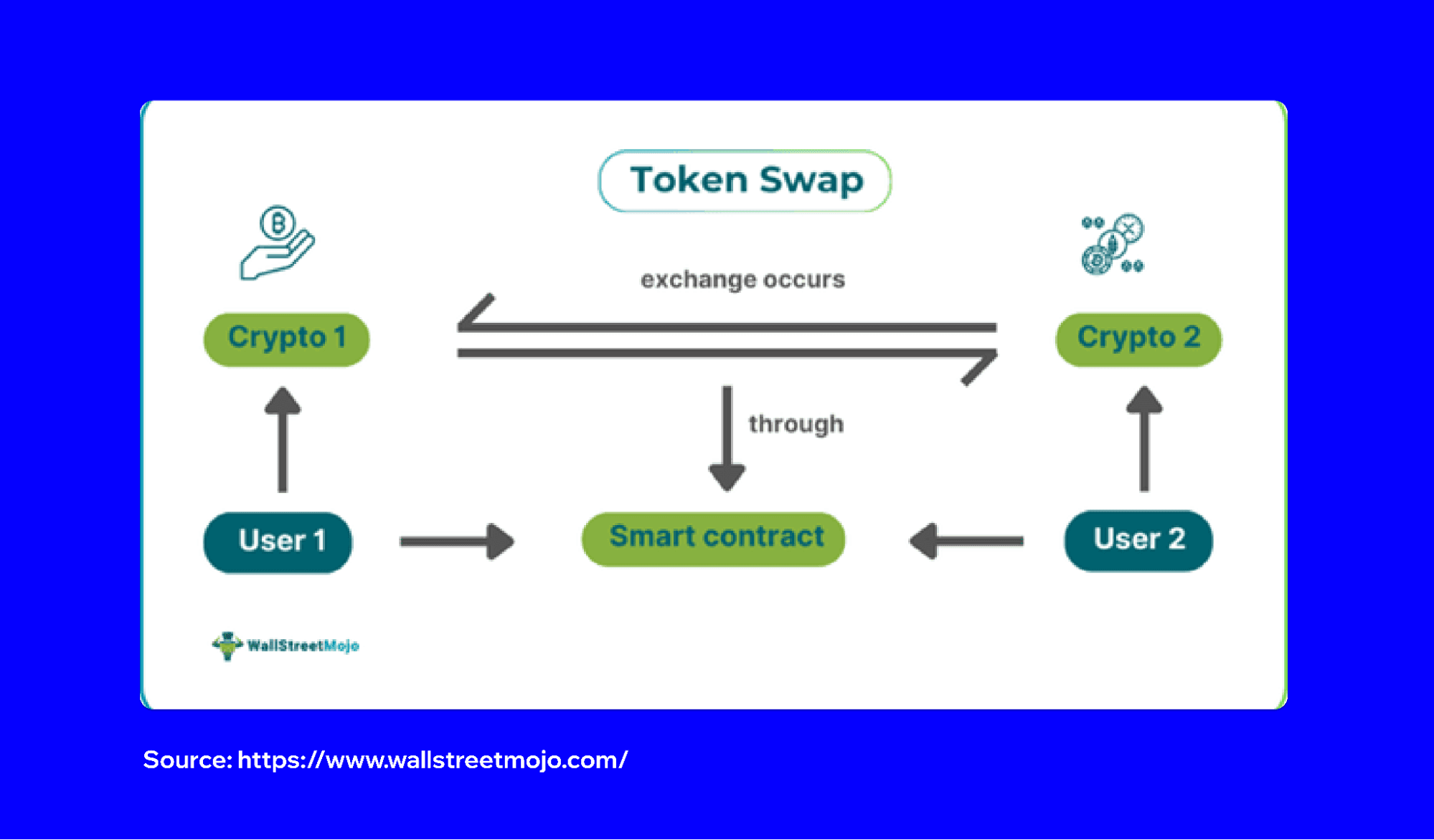
When you swap tokens in Trust Wallet, you exchange one token for another using decentralized exchanges (DEXs) integrated into the app. Swaps happen directly in your Trust Wallet app, and transactions are recorded on the blockchain. There is no need for sign-ups, lengthy verification procedures, or waiting for deposits to clear. Swapping tokens with Trust Wallet is simple and keeps full control of your assets in your hands. Every step happens on-chain, and Trust Wallet never takes custody of your tokens. Swaps are useful when you want to move between cryptocurrencies quickly to access new projects, diversify holdings, or pay with a different token.
Supported Chains in Trust Wallet
Trust Wallet supports token swaps on major blockchains. The most popular of these include Ethereum, BNB Chain, Polygon, and Solana. Each chain offers access to different tokens and DeFi platforms. The swap feature connects with top DEXs. Trust Wallet continuously expands supported chains, so newer blockchains may be added. You can check which networks are available for swaps in the “Swap” feature in the Trust Wallet app. You can browse the available token and network dropdown menus.
Step-by-Step: How to Swap Tokens in Trust Wallet
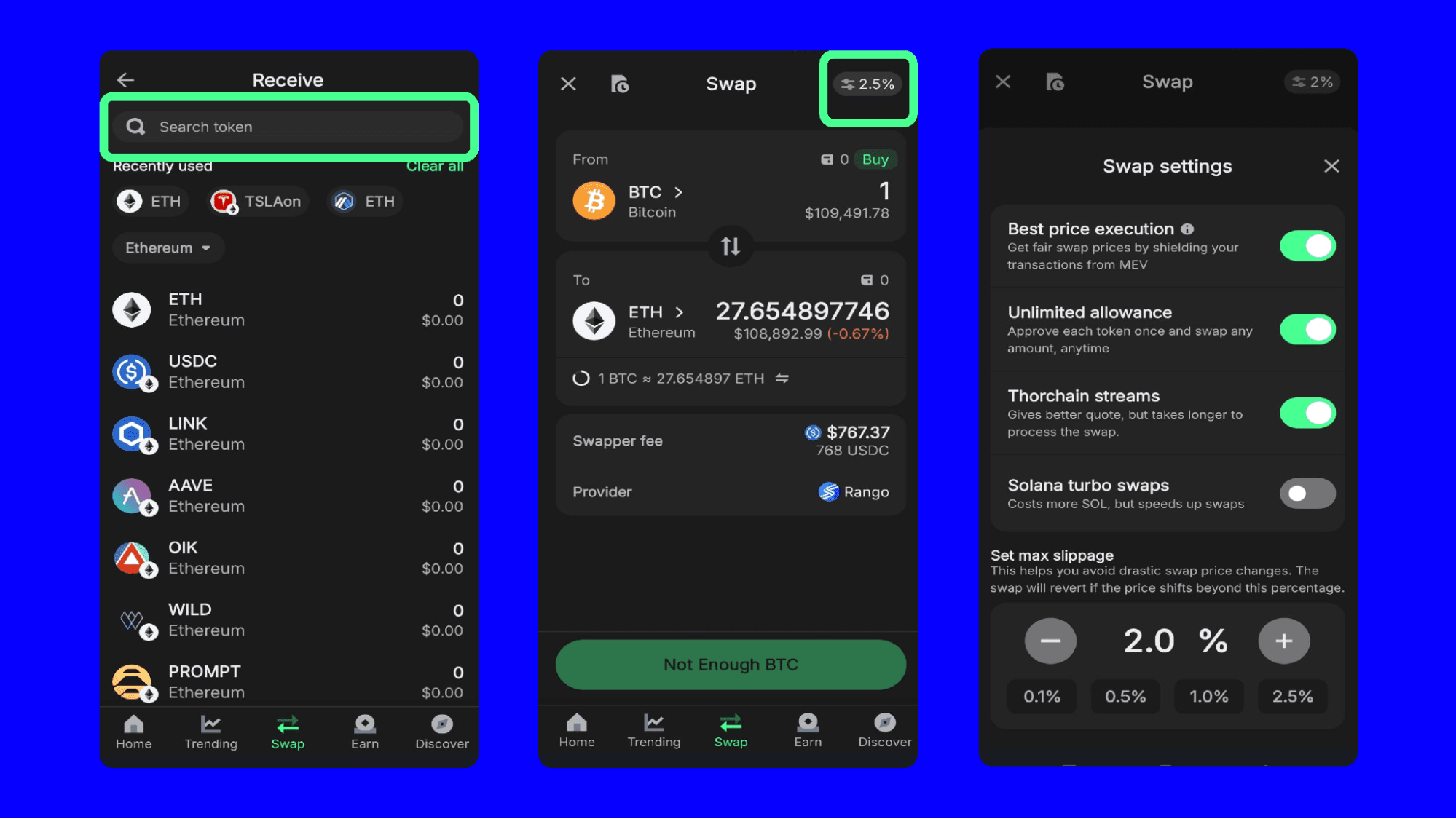
Swapping tokens in Trust Wallet is quick and intuitive. First, install the app and fund your wallet with the tokens you want to exchange. Navigate to the “Swap” tab, visible at the bottom of the screen. Trust Wallet automatically displays the available tokens in the current wallet and shows which can be swapped on your chosen chain. Select the token you wish to swap from the “From” field, then choose the token you want to receive in the “To” field. The app will calculate the rate and display the minimum amount you’ll receive after swapping. Before confirming, review the estimate carefully.
Make sure you have enough of the network’s native cryptocurrency to pay for network fees. Once ready, press “Swap.” Trust Wallet sends the transaction to the relevant DEX. The process may take a few seconds to a couple of minutes depending on network congestion. After the transaction finalizes, the swapped tokens appear in your wallet balance. Everything happens inside the app without redirects or complicated sign-ups.


What Fees You Pay When Swapping Tokens
When you swap tokens, you will have to pay fees. The first is the network fee, also called a transaction or gas fee. The fee goes to blockchain validators or miners and depends on congestion, complexity, and the chain chosen.
The second fee is the swap fee charged by the decentralized exchange that powers the swap. The percentage is included in the exchange rate shown when previewing the swap inside Trust Wallet. The exact amount is visible before confirming and varies according to which DEX is handling the trade.
Always check the final amount before confirming, so there are no surprises. Make sure you have enough network tokens available to pay fees, or the transaction can fail. Trust Wallet does not charge extra fees beyond what the DEX and blockchain require.
When Swapping May Not Be Ideal
While swaps in Trust Wallet are convenient, there are times when they may not suit the situation. Occasionally, tokens have low liquidity, meaning not enough buyers or sellers exist to offer a fair price. Low liquidity can cause steep price changes (called "slippage") and you may get less than expected.
Another case to avoid swapping is when large amounts are involved. Swapping big transactions on DEXs can move prices against the trader and cause higher slippage and fees. In these cases, more advanced trading platforms or strategies might work better.
Some tokens are restricted or unsupported for swaps, often because of technical reasons or regulatory controls. Trust Wallet lets you know when swaps are unavailable.
Top Things to Remember
Swapping tokens in Trust Wallet is a simple way to trade crypto without using a centralized exchange. You always control your assets. Read each swap estimate and understand fees, liquidity, and network requirements before making a trade. Swaps suit most people who want fast, private, and self-custodial token exchanges on supported chains.
Download Trust Wallet Disclaimer: Content is for informational purposes and not investment advice. Web3 and crypto come with risk. Please do your own research with respect to interacting with any Web3 applications or crypto assets. View our terms of service. Join the Trust Wallet community on Telegram. Follow us on X (formerly Twitter), Instagram, Facebook, Reddit, Warpcast, and Tiktok
Note: Any cited numbers, figures, or illustrations are reported at the time of writing, and are subject to change.