




お知らせ
Trust Wallet Introduces Limit Orders for Swaps
投稿をシェア
概要
Trust Wallet now supports limit orders on swaps, letting you set a target price for any token-to-token trade and walk away. The swap goes through automatically when the market gets there.
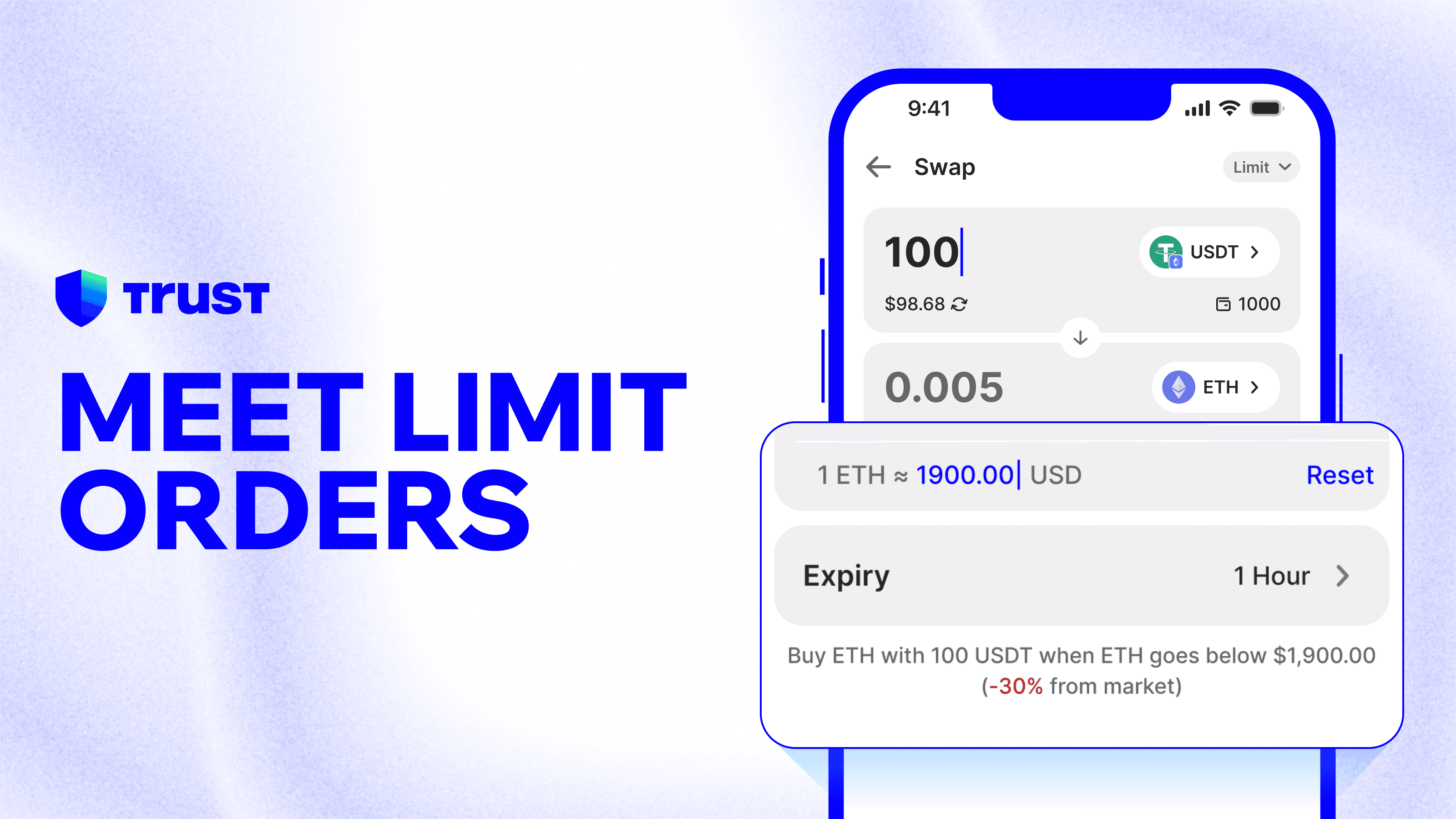
We're excited to introduce Limit Orders on Trust Wallet — an easier way to swap that puts you in control of price, not just timing.
Instead of accepting whatever the market offers right now, you set the exact rate you want. When conditions are met, the swap is processed automatically.
This is available now on Trust Wallet mobile, across token-to-token swaps.
The Problem With Instant Swaps
Crypto moves fast. Prices can shift in minutes — and if you've ever wanted to buy a token at a better entry point, you've faced a frustrating choice: swap now at the current rate, or wait manually and risk missing the window entirely.
Most people either overpay or don't enter at all.
Trust Wallet's Limit Orders fix this.
What Limit Orders Do
A limit order lets you set the exact price at which you want a swap to process. Once you confirm, the swap is processed automatically through the protocol when that price is reached — from your self-custody wallet, so you never give up control of your assets.
You set the condition. The swap goes through when the market gets there.
How to Place a Limit Order
Open Trust Wallet and go to Trade.
Select Swaps → Market → Limit.
Select your token pair.
Enter your swap amount and your target price.
Tap Confirm and sign the order.
When the market hits your price, the swap goes through automatically. You'll receive a notification in-app the moment it goes through.
Changed your mind? Cancel any open order at any time. You stay in control throughout.
Explore in Trade
Manage Your Open Orders
All your active limit orders are visible in one place. You can see the token pair, the amount, your target price, and when the order was placed. Nothing goes through without your original confirmation, and nothing is hidden.
If market conditions change, cancel and re-create an order in seconds.
Self-Custody, Throughout
Limit orders on Trust Wallet work the same way everything else does: your keys, your assets, your control.
Your assets stay in your self-custody wallet until the moment a trade goes through, and even then, the output goes straight back to you. There's no exchange account to open and no third party holding your funds at any point.
This is limit order execution without giving up ownership. That's something custodial platforms simply can't offer.
One of the First Self-Custody Mobile Wallets With Limit Orders on Swaps
Limit orders have long been standard on centralized exchanges, but until now, they've been largely absent from self-custody mobile wallets. Trust Wallet is one of the first major self-custody mobile wallets to bring limit orders to swaps, across multiple chains and token pairs.
This is part of a broader shift in how Trust Wallet is built: from apps that require you to act at the right moment, to a wallet that works when conditions are right. You define the conditions. Trust Wallet surfaces the tools.
FAQ
What is a limit order? A limit order is an instruction to swap only when the market reaches a price you specify. Unlike a market swap, which fills immediately at the current rate, a limit order waits until your target price is hit.
How is this different from a regular swap? A regular swap on Trust Wallet fills at the best available price right now. A limit order holds until the market reaches the price you set. You're trading on your terms, not the market's timing.
Is Trust Wallet among the first self-custody mobile wallets with limit orders? Yes. Limit orders have existed on centralized exchanges and on some web-based DeFi platforms, but very few self-custody mobile wallets have offered them across swaps at this scale.
Will my order always be filled? Your order goes through when the market price reaches your target and sufficient liquidity is available. If liquidity is low at the time, the order may be partially filled or may not fill at all. You'll be notified either way.
Can I cancel my order? Yes. Cancel any open limit order at any time from the Open Orders screen. Cancellation is immediate.
Can I edit an existing order? Not in this version — to change an order, cancel it and create a new one with the updated parameters.
Do my assets leave my wallet when I place a limit order? No. Your assets remain under your control in your self-custody wallet. Nothing moves until your order fills, and the output goes straight back to your wallet when it does.
Where do I find my open orders? In the Swap section, under the Open Orders tab. All active and processed orders are visible there.
Is there a fee for limit orders? Standard swap fees apply when your order fills. There's no additional fee for placing or holding a limit order.
Which chains and tokens are supported? Limit orders are available across supported token-to-token pairs at launch. Check the Swap screen in the Trust Wallet app for current availability.
Is this available in my country? Availability may vary by region. Check the Trust Wallet app for availability in your location.
Disclaimer: Content is for informational purposes and not investment advice. Web3 and crypto come with risk. Please do your own research with respect to interacting with any Web3 applications or crypto assets. View our terms of service.
Join the Trust Wallet community on Telegram. Follow us on X (formerly Twitter), Instagram, Facebook, Reddit, Warpcast, and Tiktok
Note: Any cited numbers, figures, or illustrations are reported at the time of writing, and are subject to change.