

No more juggling seed phrases. No more creating new wallets for every test. No more burner chaos.
With the latest Trust Wallet Extension update, you can now create multiple accounts under a single recovery phrase — giving you flexibility and speed without compromising on self-custody.
Whether you’re testing new dApps, keeping funds organized, or separating your Degen wallet from your main stack — now you can do it all with just one seed phrase.
Try it out now:
Why We Built This
Before, creating a new account meant generating a whole new wallet — and with it, a new recovery phrase to manage and secure. That led to clunky UX, especially for devs, testers, or multi-purpose users.
Now, you can simply generate sub-accounts under your existing wallet. No new mnemonic. No extra friction. Just clean, self-custodial flexibility.
Why It Matters
Better UX: Manage multiple accounts under one phrase
Safer: Fewer mnemonics to write down, store, or worry about
Faster: Switch between accounts instantly
Organized: Separate funds for main wallet, test wallet, Degen wallet, and more
And yes — all accounts are fully self-custodial, secured by your original 12-word phrase.
What Is a Recovery Phrase?
Your 12-word recovery phrase is the master key to your wallet.
Every account created under that wallet — including new sub-accounts — is tied to that same phrase.
So if you ever lose access, all you need is that one phrase to recover every account.
Learn more about Recovery Phrases.
How to Use Multi-Account in Trust Wallet Extension
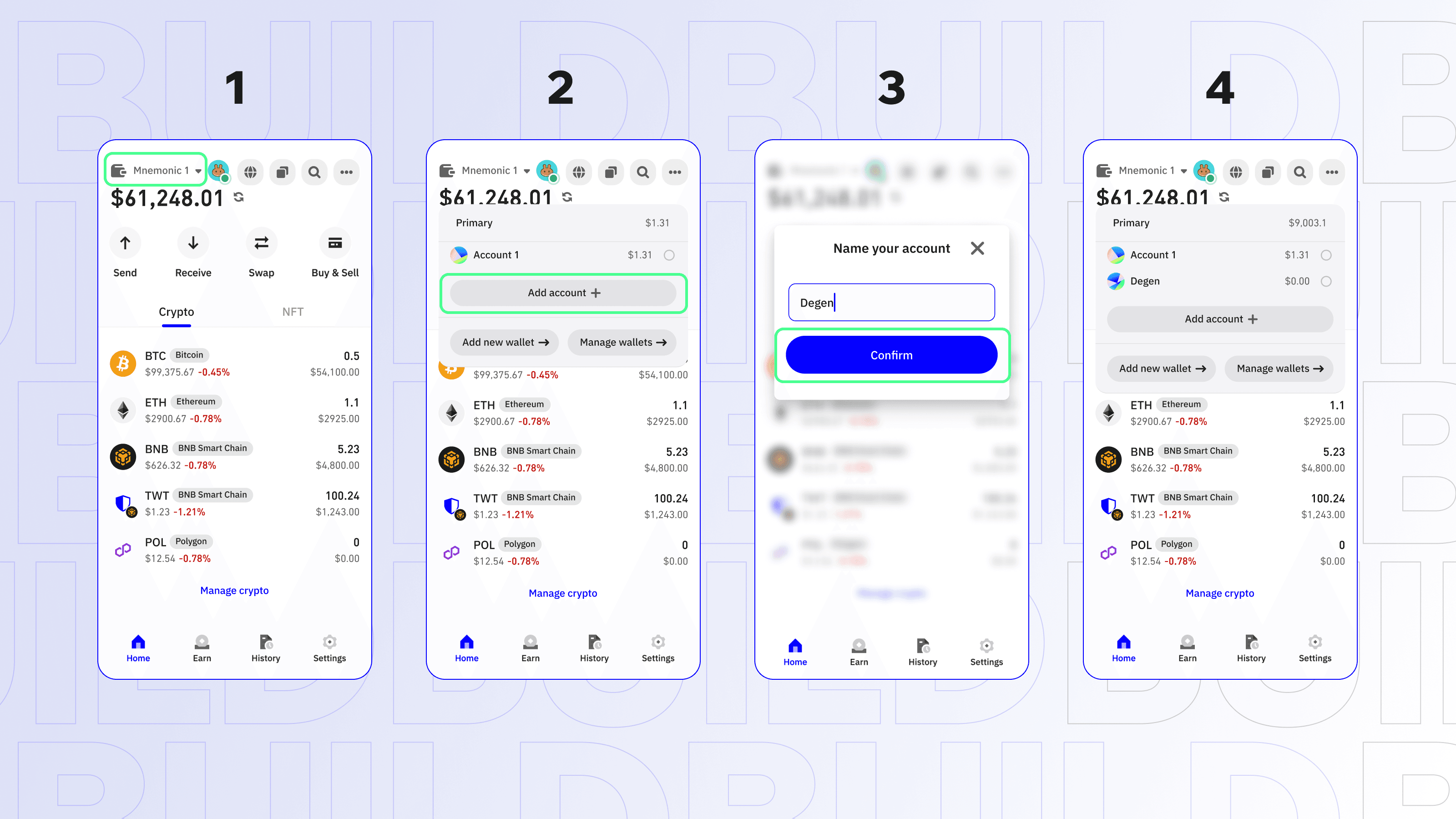 Here’s how to get started:
Step 1: Open Trust Wallet Extension
Make sure you’re on the latest version. Download or update here: https://trustwallet.com/download
Step 2: Open Wallet Dropdown
Click the wallet dropdown at the top-left corner of the extension.
Step 3: Click “Add Account +”
You’ll see an option to create a new sub-account under your existing wallet.
Step 4: Name Your Account
Give it a name (Main, Degen, Testnet, etc.) — then click Confirm. You now have a brand-new address under your original wallet.
Switch between accounts with just a click — no logins, no seed switching.
A Note About Chain Support
All EVM-compatible chains are supported, but some blockchains (like Decred or UTXO) are currently marked as “Not Supported” for sub-accounts. These will be labeled clearly in the UI, and we’re working on expanding support.
TL;DR
You can now create multiple accounts under one seed phrase in the Trust Wallet Extension
Switch between them instantly, securely, and with zero hassle
The same security. A much better experience.
You asked — we shipped.
Try it now:
Disclaimer: Content is for informational purposes and not investment advice. Web3 and crypto come with risk. Please do your own research with respect to interacting with any Web3 applications or crypto assets. View our terms of service.
Join the Trust Wallet community on Telegram. Follow us on X (formerly Twitter), Instagram, Facebook, Reddit, Warpcast, and Tiktok
Note: Any cited numbers, figures, or illustrations are reported at the time of writing, and are subject to change.