




BLOG_PAGE.section-article.category.company
Trust Wallet Integrates MegaETH Network
Bagikan posting
Secara Singkat
Explore MegaETH support in Trust Wallet for managing assets on a high-performance Ethereum Layer-2 network.
We’re excited to share that Trust Wallet now supports the MegaETH network, enabling users to send, receive, swap (trade), manage, and securely store assets on MegaETH directly within Trust Wallet.
MegaETH is a next-generation Ethereum Layer-2 network designed to deliver real-time performance while remaining fully compatible with the Ethereum Virtual Machine (EVM), enabling existing Ethereum smart contracts and tooling to work without modification.
The addition of MegaETH expands Trust Wallet’s multi-chain coverage and provides easier access to emerging high-performance Ethereum ecosystems, allowing users to store and move assets on MegaETH seamlessly within the app.
Built around an optimized execution pipeline focused on low latency and high throughput rather than traditional batch-based execution, MegaETH targets significantly faster confirmation times and higher transaction capacity, making it suitable for high-activity applications such as decentralized finance, gaming, payments, and other interactive on-chain use cases.
To use the integration, make sure you’re running the latest version of Trust Wallet.
Start Exploring MegaETH Tokens
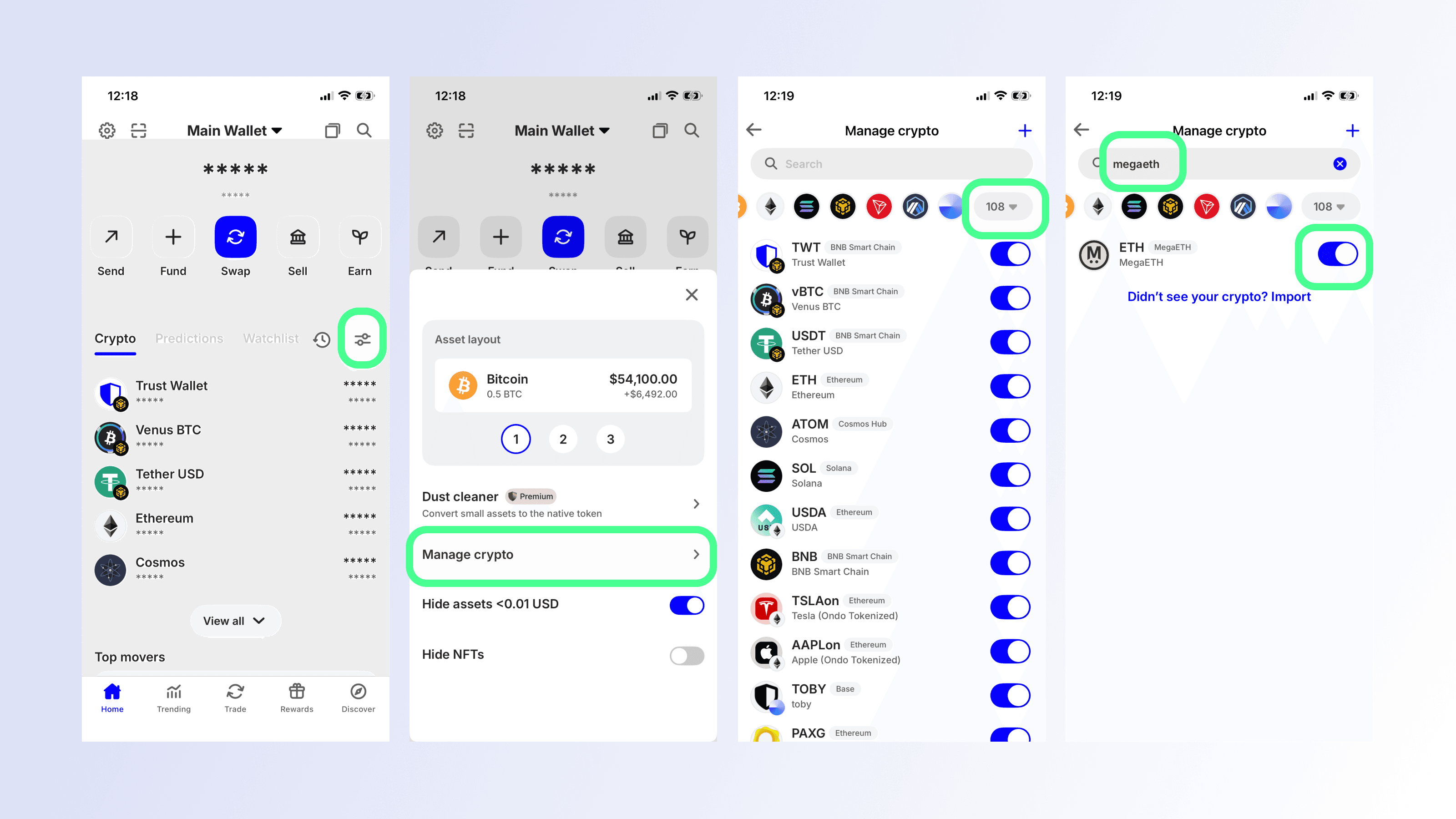
Now that Trust Wallet supports MegaETH tokens, you can easily filter for assets on the network at any time. You can scroll through your balances, or follow these steps:
Select tokens settings icon and then select Manage crypto.
Open the network selector and choose MegaETH
Turn on the toggle for any assets you'd like displayed on your main balances screen.
How to Receive, Send and Swap (Trade) MegaETH Tokens in Trust Wallet
Depositing or withdrawing MegaETH-based assets is straightforward. Here’s how it works.
Receive (Deposit) MegaETH Tokens in Trust Wallet
Tap the Search icon from the home screen.
Search for the MegaETH asset you want to deposit (selecting the MegaETH network from the network dropdown before you search, makes this even easier).
Select the Receive button.
Copy your deposit address.
Paste this address into the sending wallet or platform you are transferring from.
Send (Withdraw) MegaETH Tokens
Search for and select the MegaETH asset you want to send.
On the token’s page, tap Send.
Enter the destination address and amount.
Review the details and select Confirm.
Swap Tokens on MegaETH in Trust Wallet
Trust Wallet also lets you swap tokens directly on the MegaETH network, making it easy to move between assets without leaving the app.
From the home screen, select the token you want to swap.
Tap Swap.
Choose the token you want to receive and make sure the MegaETH network is selected.
Enter the amount you want to swap.
Review the swap details, including fees and estimated output.
Tap Confirm to complete the swap.
Swapping within Trust Wallet removes the need to connect to external platforms, helping you explore the MegaETH ecosystem with a simple, self-custodial experience.
Stay Tuned for More Updates
MegaETH assets support is just the start - Buy support are coming soon. Trust Wallet will continue expanding compatibility and improving the multi-chain experience so you can explore a wider range of decentralized networks smoothly.
Be sure to update Trust Wallet to the latest version to access MegaETH token support. More improvements are on the way, so stay tuned as the MegaETH ecosystem evolves.
Disclaimer: Content is for informational purposes and not investment advice. Web3 and crypto come with risk. Please do your own research with respect to interacting with any Web3 applications or crypto assets. View our terms of service.
Join the Trust Wallet community on Telegram. Follow us on X (formerly Twitter), Instagram, Facebook, Reddit, Warpcast, and Tiktok
Note: Any cited numbers, figures, or illustrations are reported at the time of writing, and are subject to change.