





Rehberler
Browser Extension v2.68 Security Incident: Recommended Actions
Gönderiyi paylaş
Kısaca
Learn how to secure your Trust Wallet, as well as migrate funds safely, and get support if your wallet was affected by a previous security incident.
Key takeaways:
We identified a security incident affecting the Trust Wallet Browser Extension version 2.68 between December 24-26, 2025.
Based on our investigation, this security incident affects:
Only Trust Wallet Browser Extension version 2.68 users who opened the extension and logged in during the affected period
It does not affect:
Any Trust Wallet mobile app users
Users on any other browser extension versions
Browser Extension v2.68 users who opened and logged in after December 26, 2025 at 11:00 UTC.
What actions should I take?
If you have received an app push via the Trust Wallet mobile app or you see a security incident banner on your Trust Wallet Browser Extension, you may still be using the compromised wallets. It's critical to take the following actions to ensure your fund safety. Please follow the steps below immediately.
Step 1: Update your Browser Extension to the latest version on Chrome Web Store
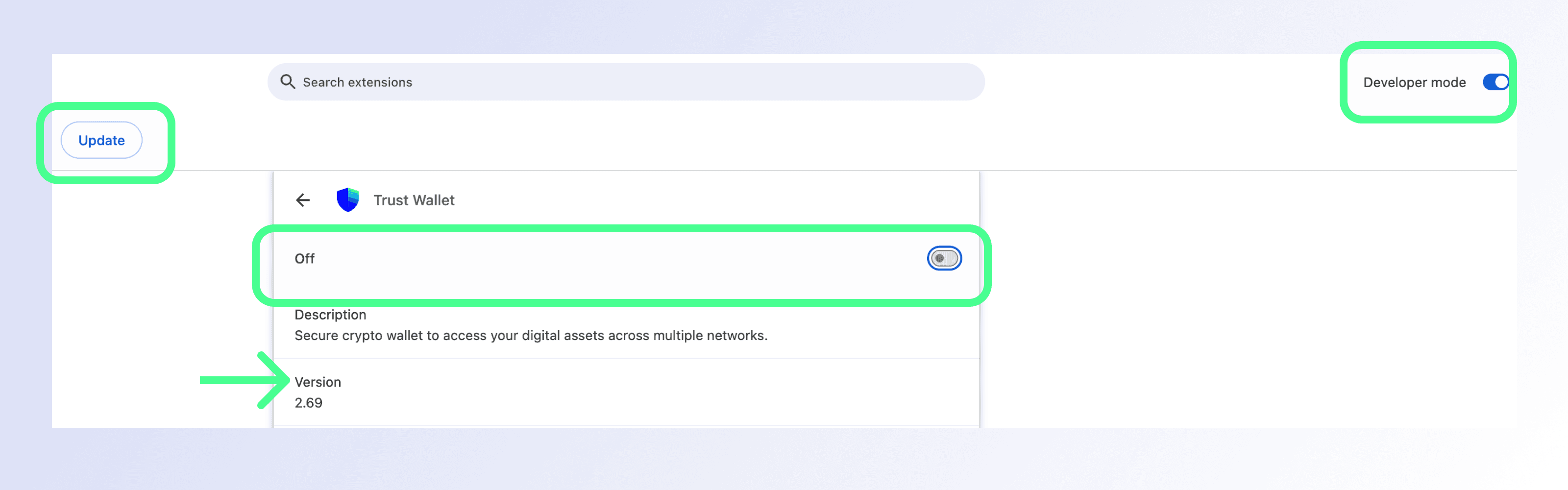
Step 1.1: Copy and paste the following into your Chrome address bar, then press Enter (this will open the Trust Wallet Browser Extension settings page): chrome://extensions/?id=egjidjbpglichdcondbcbdnbeeppgdph
Step 1.2: Switch the toggle to "Off" below Trust Wallet if it's still "On".
Step 1.3: Click "Developer Mode" in the upper right corner.
Step 1.4: Press "Update" in the left upper corner.
Step 1.5: Check the version number: 2.69 or later.
Below you'll see a screenshot of the Browser Extension settings page with the key areas you need to interact with. You'll also see exactly where to check whether you've been updated to the correct version number 2.69 or later.
Step 2: Create a new wallet address
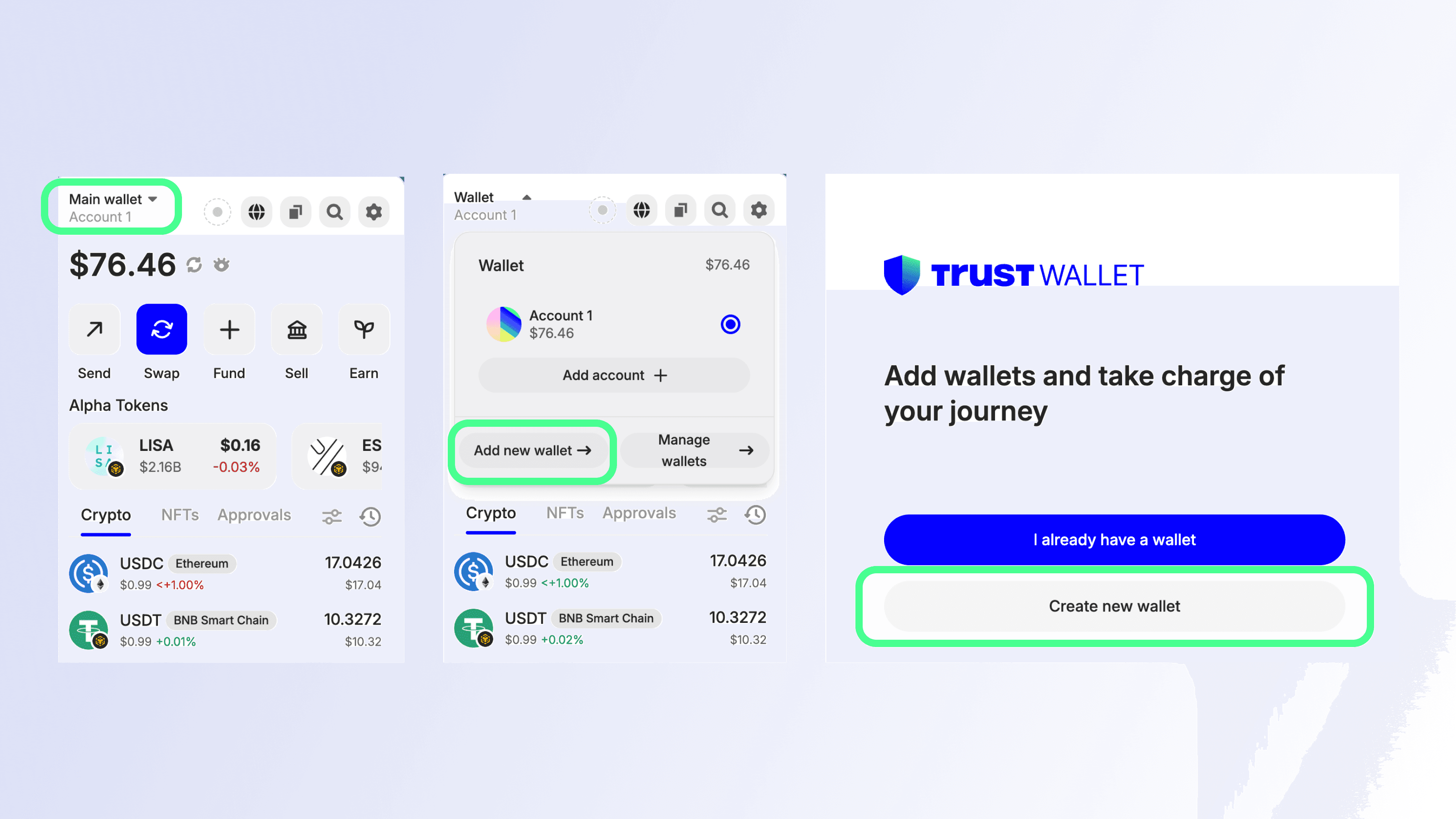
Step 2.1: Open your wallet and select the wallet selector (wallet name with the down arrow) at the top section of the home screen
Step 2.2: Choose "Add new wallet" if using the extension, or "Add wallet" button if using the mobile app.
Step 2.3: Choose "Create new wallet" and complete any remaining steps to access the wallet.
Creating a new wallet using the Browser Extension
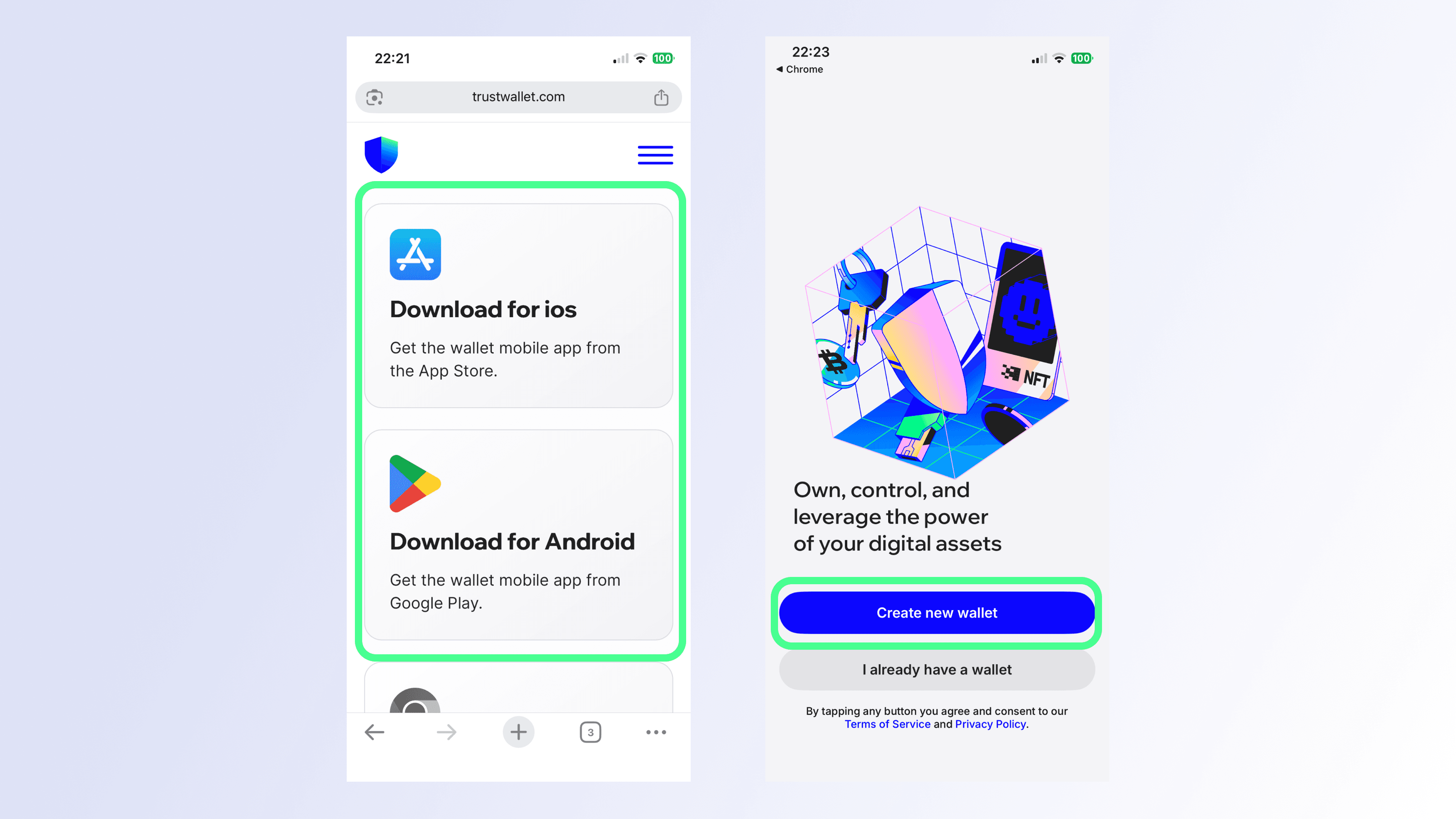
Creating a new wallet using the mobile app
Want to use the mobile app but don't have it installed yet?
Simply go to the official Trust Wallet website https://trustwallet.com/download, and choose your preferred mobile device and follow the simple install steps.
Once installed on your device, open Trust Wallet, select "Create new wallet" and follow the simple steps to access your new wallet.
Safety tip: Be sure to back up your wallet's secret phrase (also known as recovery phrase), to help improve the security of your wallet, using these instructions.
Step 3: Move all funds from your previous wallet address(es) immediately
Safety tip: Move funds to your mobile wallet, or to the browser extension only after updating to the latest version.
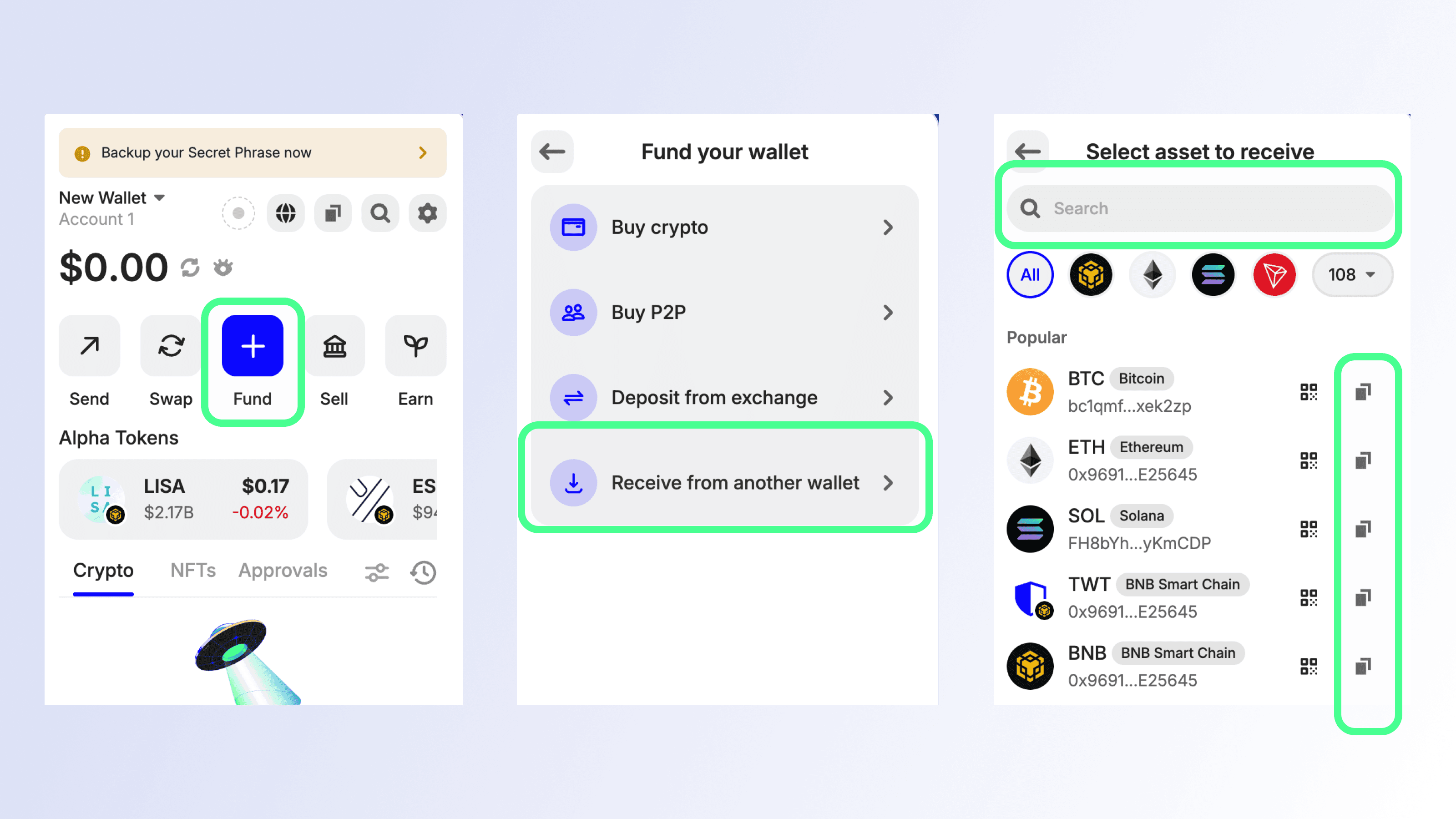
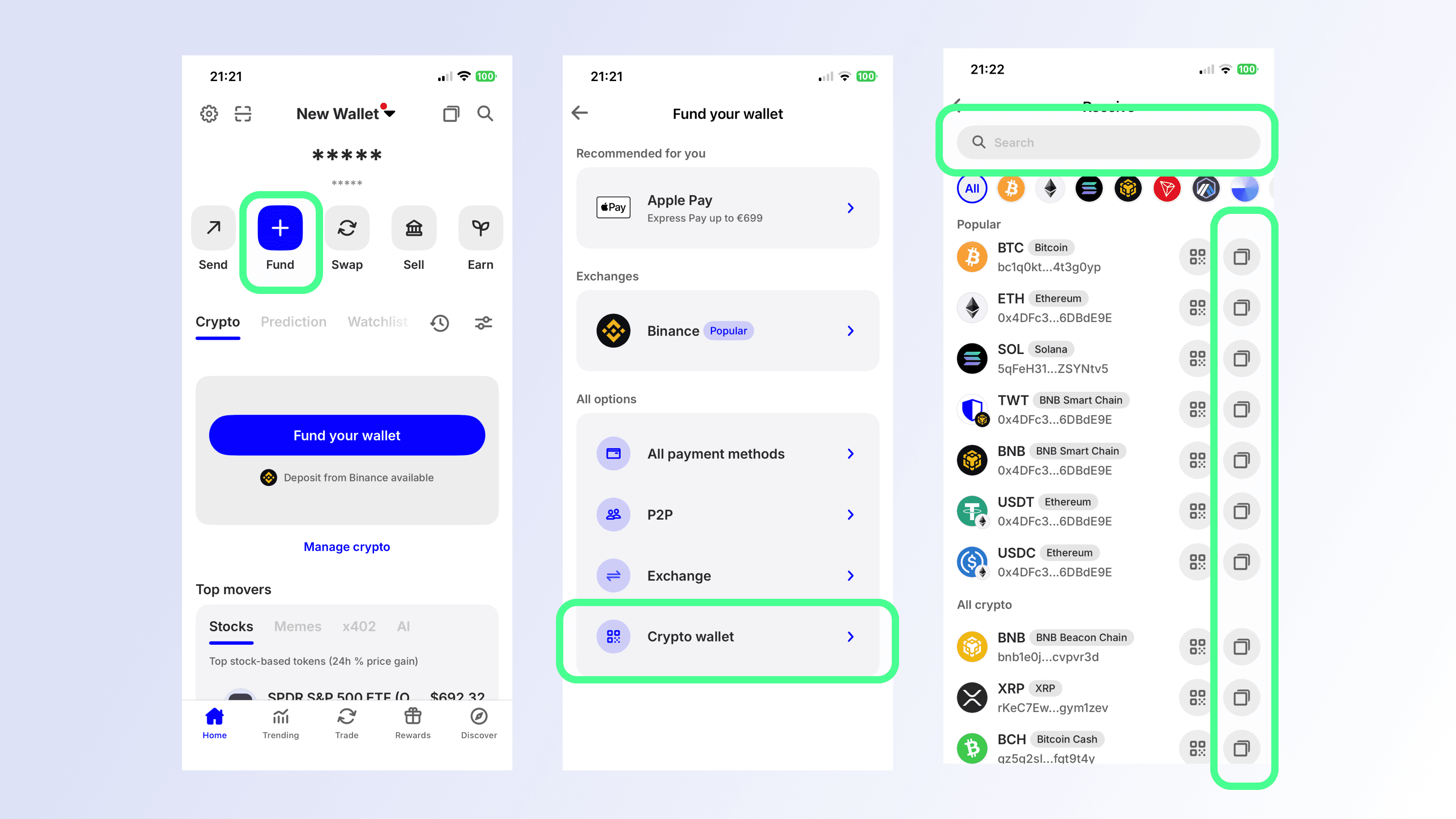
Step 3.1: Get the receive (deposit) address for the asset you want to deposit into the newly created wallet address
Open your new wallet and select "Fund" from the home screen.
Choose "Receive from another wallet" if using the extension, or "Crypto wallet" if using the mobile app.
Search for the token you want to transfer to the new wallet, and copy the deposit address.
Get your new wallet address using the Browser Extension
Do this for every account in your wallet.
Get your new wallet address using the mobile app
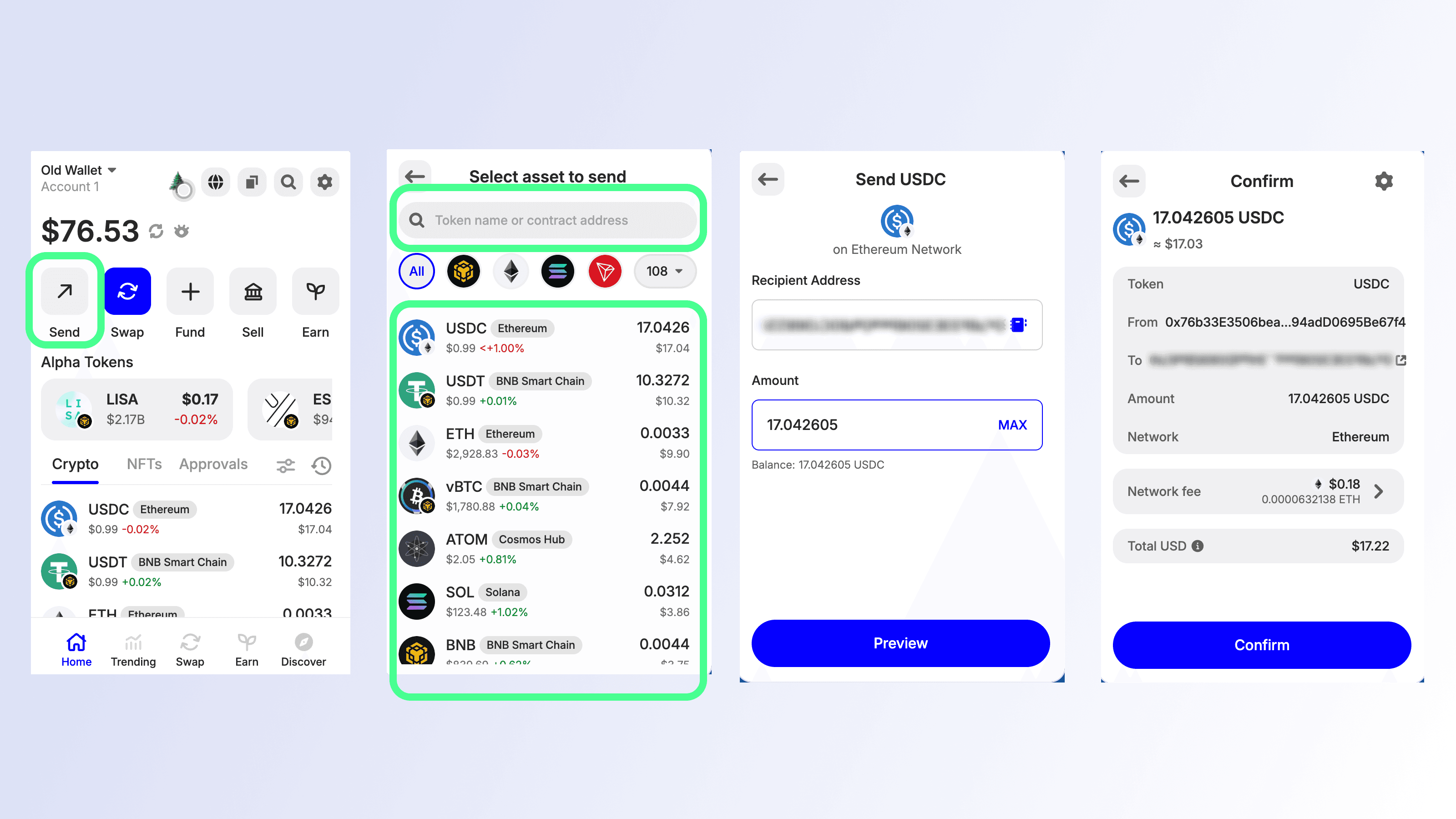
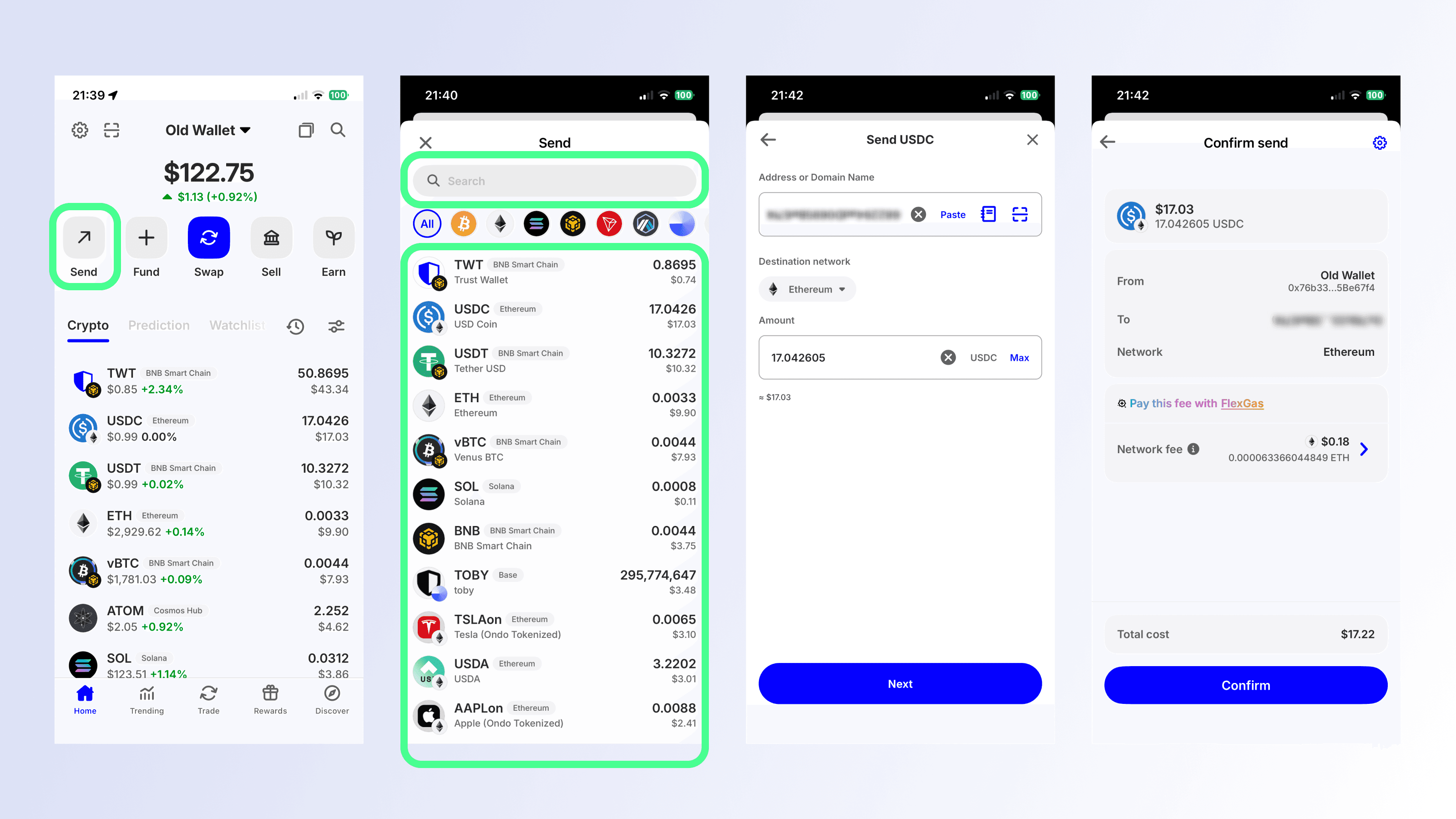
Step 3.2: In your old vulnerable wallet, transfer assets to the new wallet
Open the vulnerable wallet and select "Send."
Search for and choose the token you would like to send.
Enter your newly created wallet address and input the amount.
Select "Preview" if using the extension, or "Next" if using the mobile app.
Select "Confirm" and complete the remaining steps to send.
Sending assets from old wallet to new wallet address using the extension
Sending assets from old wallet to new wallet address using the mobile app
Step 4: Contact our Support Team using form
If you suspect you have been impacted by the incident and experienced any loss of funds, please contact our Support Team by filling out the form at be-support.trustwallet.com.
We will take the incident case with priority and may need more information from you to verify your identity and ownership before reimbursement for your loss from this particular security incident.
Frequently Asked Questions
Who was affected by this incident?
Based on our investigation, this security incident affects:
Only Trust Wallet Browser Extension version 2.68 users who opened the extension and logged in during the affected period
It does not affect:
Any Trust Wallet mobile app users
Users on any other browser extension versions
Browser Extension v2.68 users who opened and logged in after December 26, 2025 at 11:00 UTC.
Was the Trust Wallet mobile app affected?
No. The incident was limited to Browser Extension version 2.68 only.
How much was impacted?
Preliminary finding suggests approximately $7 million impacted. Our investigation and monitoring is ongoing and the numbers may change.
Was this a supply-chain issue?
The issue has been isolated to Browser Extension version 2.68. Our security and engineering teams are continuing to assess the technical root cause.
Where can affected users get help?
We are doing our best to reimburse this incident victims. To start the reimbursement process, affected users should please complete this form at https://be-support.trustwallet.com to help us process your case.