

Updated as of 2nd September, 2026
Trust Wallet supports more than 100 blockchain networks and regularly reviews its network support to ensure we can continue to provide a reliable, high-quality experience for our users.
As part of our latest review, Trust Wallet will sunset support for the networks listed below on September 15, 2026.
After September 15, the networks listed below will no longer appear in the Trust Wallet network list. You will no longer be able to view, send, swap, or otherwise interact with assets on these networks through Trust Wallet unless you manually add the relevant network as a custom network or import your wallet into another compatible wallet that supports the network.
If you don't hold assets on any of these networks, no action is required.
Networks Being Sunset on September 15, 2026
Agoric
Aurora
Boba
Conflux
Decred
FIO
Firo
Flux (formerly Zelcash)
GoChain
IoTeX
KuCoin Community Chain
Manta
Merlin Chain
Meter
Moonbeam
Moonriver
MultiversX
Nano
Neon
Nimiq
Polygon zkEVM
Stride
Viction
Wanchain
In addition, please take note that the following networks have already been sunset by their respective ecosystems:
Evmos
Nebulas
Stargaze
BounceBit
What Does This Mean for Trust Handles?
As we sunset support for the FIO network, Trust Handle support in Trust Wallet will also be discontinued on September 7, 2026. New Trust Handles will no longer be available for registration, and existing Trust Handles will no longer work in Trust Wallet after this date.
After September 7, you will no longer be able to use your Trust Handle to send or receive assets, or manage and renew it through Trust Wallet.
Your Trust Handle registration will remain recorded on the FIO network. This change only affects its support within Trust Wallet. We recommend using your wallet address directly for transactions going forward.
What Does This Mean for Your Assets?
Your assets remain yours.
Trust Wallet is self-custodial, which means Trust Wallet does not hold or control your funds. Your assets remain on their respective blockchains and continue to be associated with your wallet's secret phrase.
This update changes how these networks are accessed through Trust Wallet. It does not change ownership of your assets.
There are two ways to continue accessing your assets after the transition date, September 15 2026, depending on the network.
1. For EVM-Compatible Networks
If you hold assets on an EVM-compatible network listed in this blog, you can continue using Trust Wallet by adding the network as a custom network.
Important: Adding a custom network enables visibility and interaction with that network through Trust Wallet. Trust Wallet does not verify the legitimacy, security, or reliability of custom networks, RPC endpoints, or tokens. Always make sure that the network details you enter come from a trusted source.
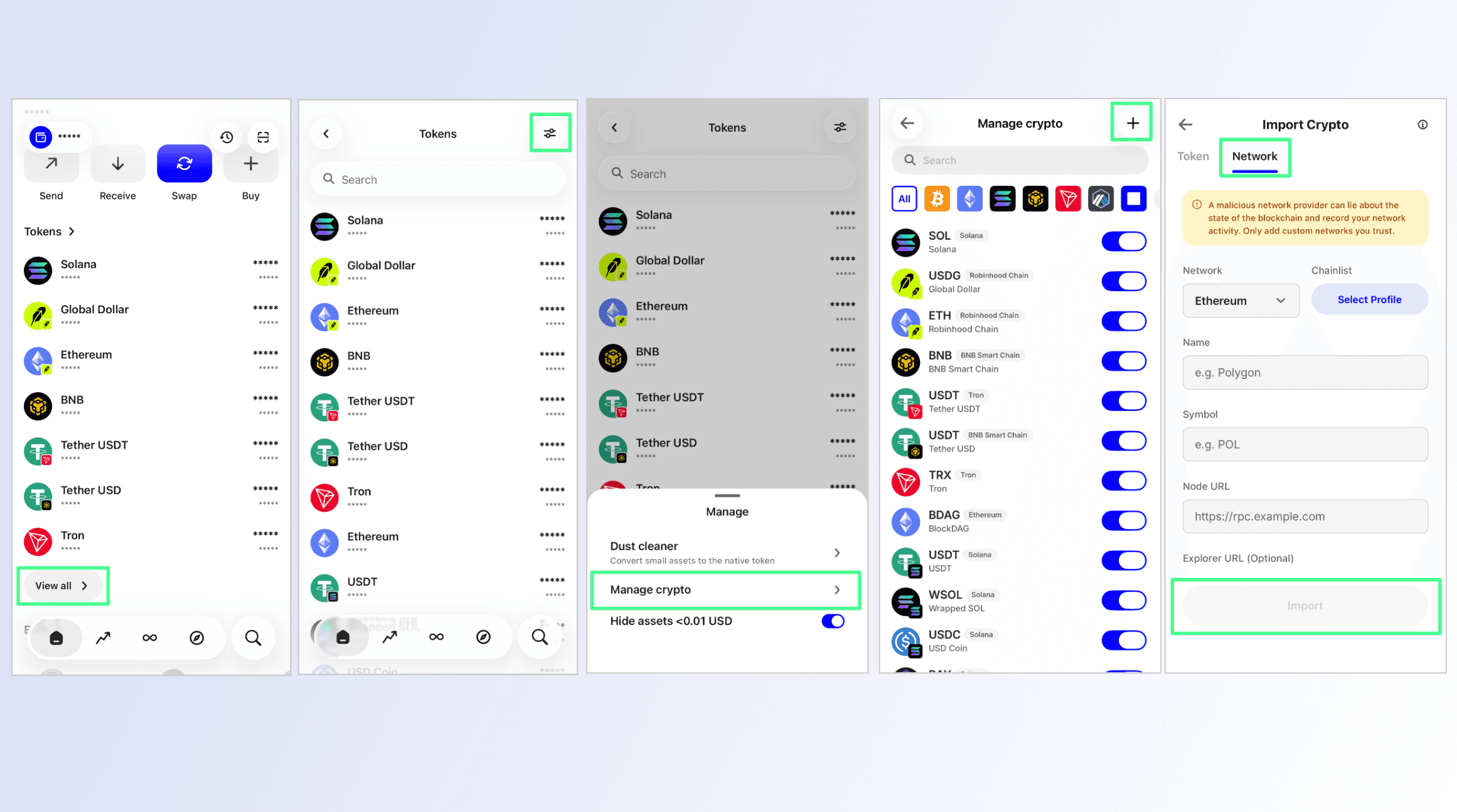
Step 1: Open the Custom Network Screen in Trust Wallet
Scroll down to the token section on the homepage.
Tap View all.
Tap the settings button in the top-right corner.
Select Manage Crypto.
Tap the "+" button.
Switch from the Token tab to the Network tab.
Enter the required network details and import the network.
Step 2: Where to Find Network Details
To add a custom network, you need accurate network parameters. A commonly used resource is Chainlist, a directory of EVM-compatible networks.
Basic steps:
- Visit Chainlist (chainlist.org).
Search for the network you want to add.
Review the available network information.
Select a trusted RPC endpoint and copy the required network details.
Enter the details in Trust Wallet and import the network.
Always verify network information before adding a custom network.
2. For Non-EVM Networks
The following networks are non-EVM and cannot be added to Trust Wallet as custom networks:
Agoric
Decred
FIO
Firo
Flux (formerly Zelcash)
MultiversX
Nano
Nimiq
Stride
If you want to keep a hold of your assets on a non-EVM network after the transition date, you can import your wallet into another compatible wallet that supports the network
Open Trust Wallet and select the wallet you want to export.
Tap the three dots next to the wallet name.
Tap Manual.
Retrieve the relevant wallet details needed to import your wallet into another wallet compatible with the relevant network.
Your existing wallet address and assets should appear automatically once the wallet is imported.
Note: Never share your Secret Recovery Phrase or private keys with anyone. Only enter your recovery credentials directly into the official application of a wallet you trust. Trust Wallet will never ask you to share your Secret Recovery Phrase or private keys.
FAQ
1. Are my funds safe?
Your assets remain on their respective blockchains and are not transferred or deleted as a result of this update. Trust Wallet is self-custodial, which means your assets remain under your control through your wallet's secret phrase.
For EVM-compatible networks, you can continue accessing your assets through Trust Wallet by adding the relevant network as a custom network using its RPC details.
For non-EVM networks, you can import your wallet into another compatible wallet that supports the relevant network.
2. What happens to my Trust Handle?
Trust Handle support in Trust Wallet will be discontinued on September 7, 2026. After this date, you will no longer be able to use your Trust Handle to send or receive assets, or manage and renew it through Trust Wallet.
Your Trust Handle registration will remain recorded on the FIO network. However, adding FIO as a custom network will not restore Trust Handle functionality in Trust Wallet.
3. Will Trust Wallet contact me to help with the transition?
Trust Wallet will never ask you to share your secret phrase, private keys, or other sensitive wallet information.
We will also never contact you asking you to move your funds to another wallet as part of this update. Be cautious of anyone claiming to represent Trust Wallet who asks you to share sensitive information or move your funds.
4. What happens after the transition date?
Starting September 15, 2026, the networks listed in this blog will no longer appear in the Trust Wallet network list.
You will no longer be able to view, send, swap, or otherwise interact with assets on these networks through Trust Wallet unless you manually add the relevant network as a custom network orport your wallet into another compatible wallet that supports the network.
If you hold assets on any of these networks, you can continue to access them through Trust Wallet by manually adding the relevant network using its RPC details.
Disclaimer: Content is for informational purposes and not investment advice. Web3 and crypto come with risk. Please do your own research with respect to interacting with any Web3 applications or crypto assets. View our terms of service.
Join the Trust Wallet community on Telegram. Follow us on X (formerly Twitter), Instagram, Facebook, Reddit, Warpcast, and Tiktok
Note: Any cited numbers, figures, or illustrations are reported at the time of writing, and are subject to change.