

Introduction
In this guide, you'll discover how to easily swap your existing crypto for BONK, using Trust Wallet.
Swapping using a Web3 wallet like Trust Wallet allows you to go from one crypto asset to another without using fiat or going through a centralized exchange. This guide focuses on acquiring BONK on the Solana blockchain, so you'll need SOL for any transaction fees, as well as SOL or a Solana-based token for the swap.
Below, we’ll cover the following:
Creating the wallet you’ll use for swapping
How to fund your wallet with the crypto you want to swap
How to swap your existing crypto for BONK
Disclaimer: Content is for informational purposes and not investment advice. Web3 and crypto come with risk. Please do your own research with respect to interacting with and holding cryptocurrencies. Exercise caution and ensure decentralized applications (dApps) you connect to and use are safe. View our terms of service at: https://trustwallet.com/terms-of-service
What is Bonk?
Bonk (BONK) is a decentralized cryptocurrency introduced in late 2022 on the Solana blockchain. This memecoin is a community-driven project, emphasizing engagement and participation in the cryptocurrency space. BONK is inspired by a meme of the same name, commonly associated with surprise or excitement. The project is notable for its airdrop of 50 trillion BONK tokens to Solana community members, including NFT collection holders, developers, and users of decentralized exchanges (DEX) on the network.
Getting Started
The first step to getting BONK is to ensure you’ve installed the latest version of Trust Wallet. Trust Wallet can be downloaded as a mobile app, or you can install the Trust Wallet Extension for your desktop browser. For this guide, we'll focus on creating a new wallet using the Trust Wallet mobile app.
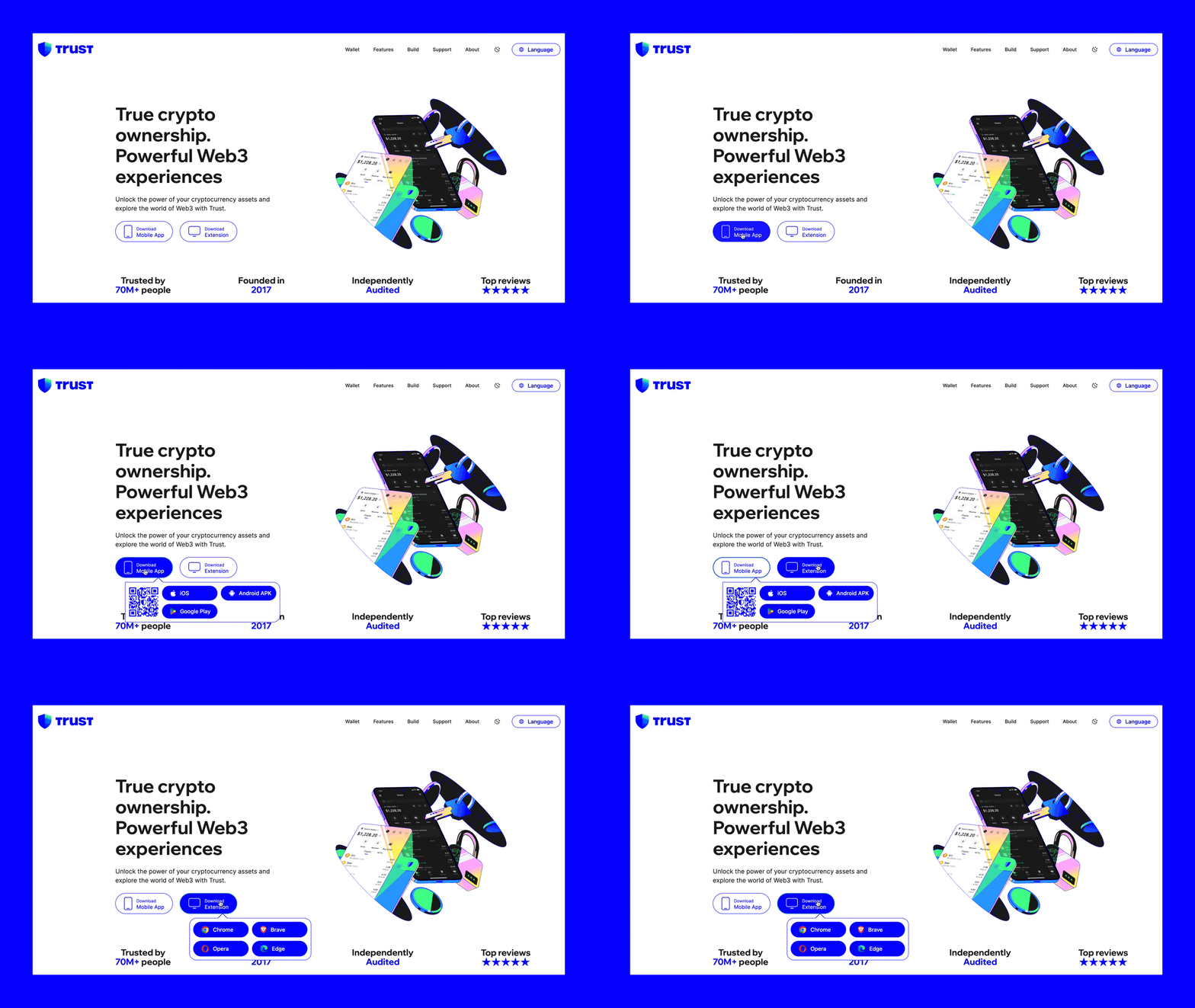
Get the most updated version of Trust Wallet
Below you’ll see the steps to create a new wallet, but you could just as easily import an existing Web3 wallet to Trust Wallet, if that’s your preference.
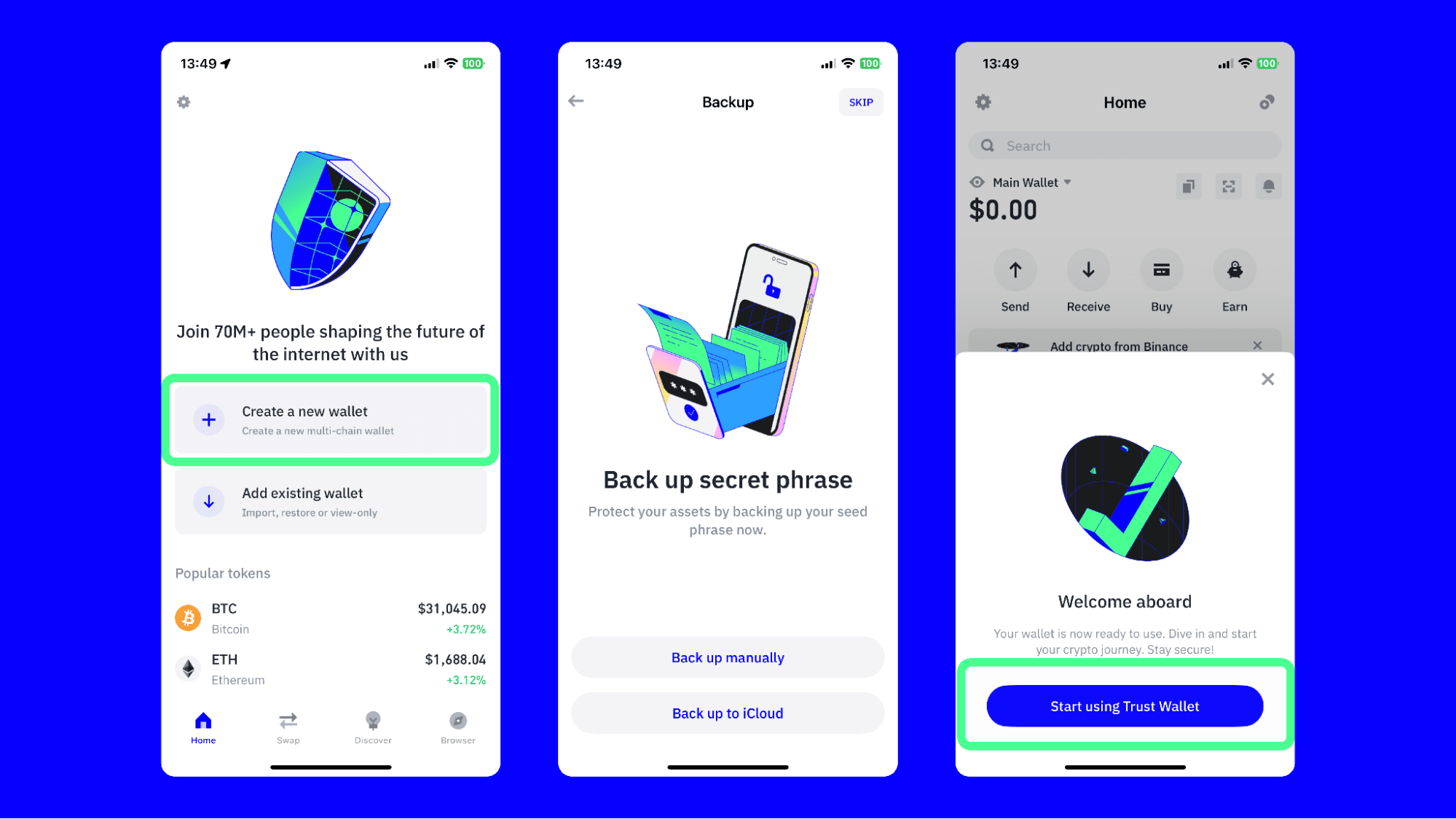
To create a new wallet:
Install, then open Trust Wallet
Choose “Create a new wallet”.
Choose your backup option, or you can optionally postpone the backup process by choosing “Skip”.
Start using Trust Wallet.
Fund Your Wallet with the Crypto You Want to Swap
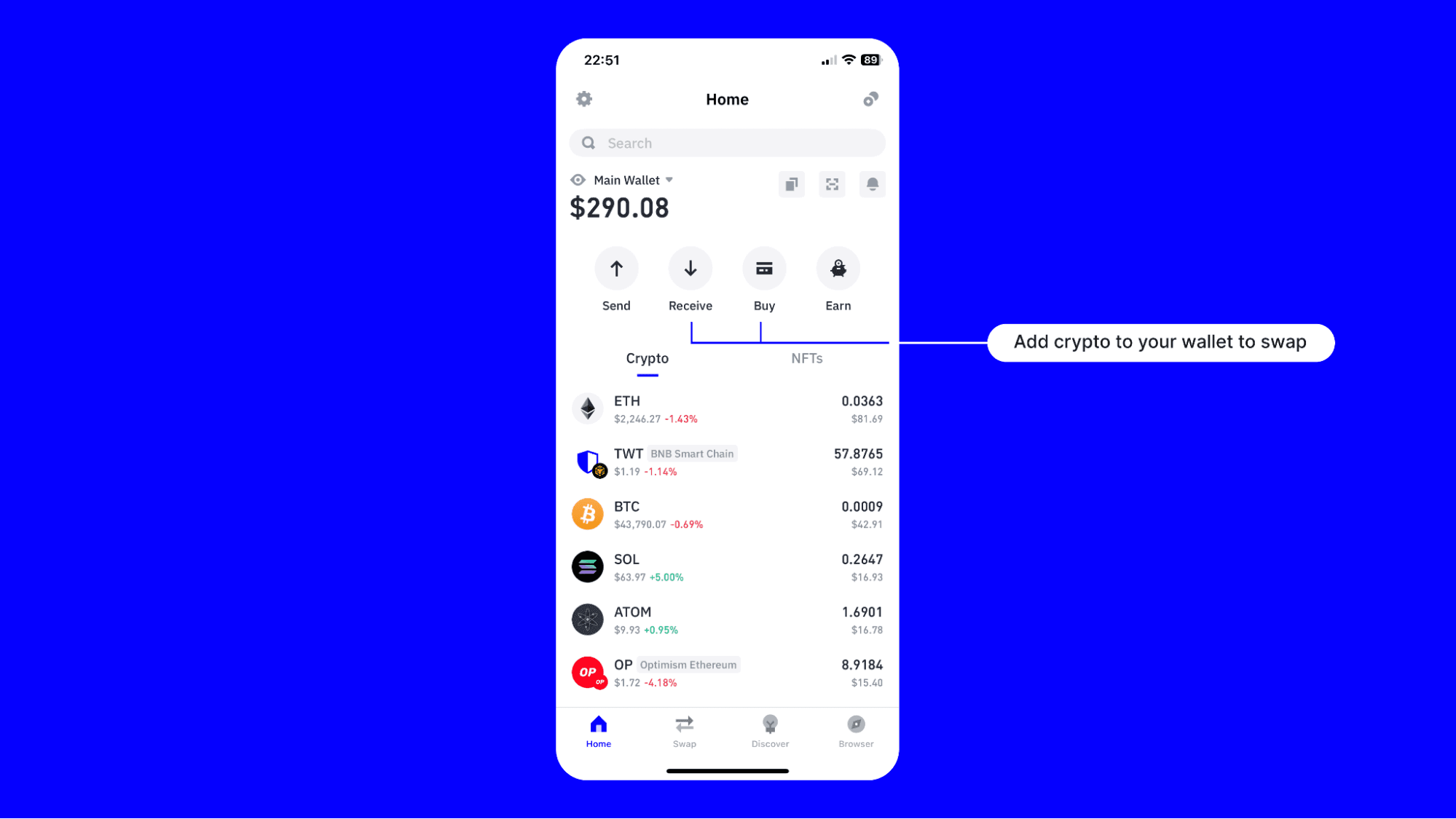
There are two main ways to add crypto to your wallet.
You can buy crypto directly using Trust Wallet via our trusted third-party providers
You can deposit crypto from another address or centralized exchange
Let’s briefly look at the steps for both.
How to Buy Crypto Using Trust Wallet
In this example we’ll look at how to buy Solana (SOL), since this is a swappable asset for BONK.
Select “Buy” from the home screen
Search for “SOL” or “Solana” and select it.
Choose the currency you want to use, then enter the amount of SOL you want to purchase.
Select the third party provider & payment method you’d like to use.
Select the Buy button and complete the remaining steps.
How to Deposit Crypto Using Trust Wallet
You can also deposit SOL easily and here’s how.
Select “Receive” from the home screen
Search for “SOL” or “Solana” and select it.
From here you have two options. You can either
Copy your deposit address and use that on your exchange account or other wallet to send funds to.
Use the “Deposit from exchange” option to deposit crypto seamlessly from your exchange account.
How to Swap SOL for BONK
Now that you have SOL or any other solana-based swappable asset, now it’s time to swap your crypto for BONK. This can be done with the Trust Wallet mobile app or the desktop browser extension. In this example, we’ll use the mobile app.
Here are the steps:
Open the Browser icon from your Trust Wallet home screen.
- Navigate to https://jup.ag/
Select “Connect” and then choose Trust Wallet to connect your wallet. Follow the remaining instructions to confirm the connection.
Choose SOL in the You’re Paying field, and BONK in the To Receive field.
Select “Swap” to initiate the swap. Wait until the transaction goes through.
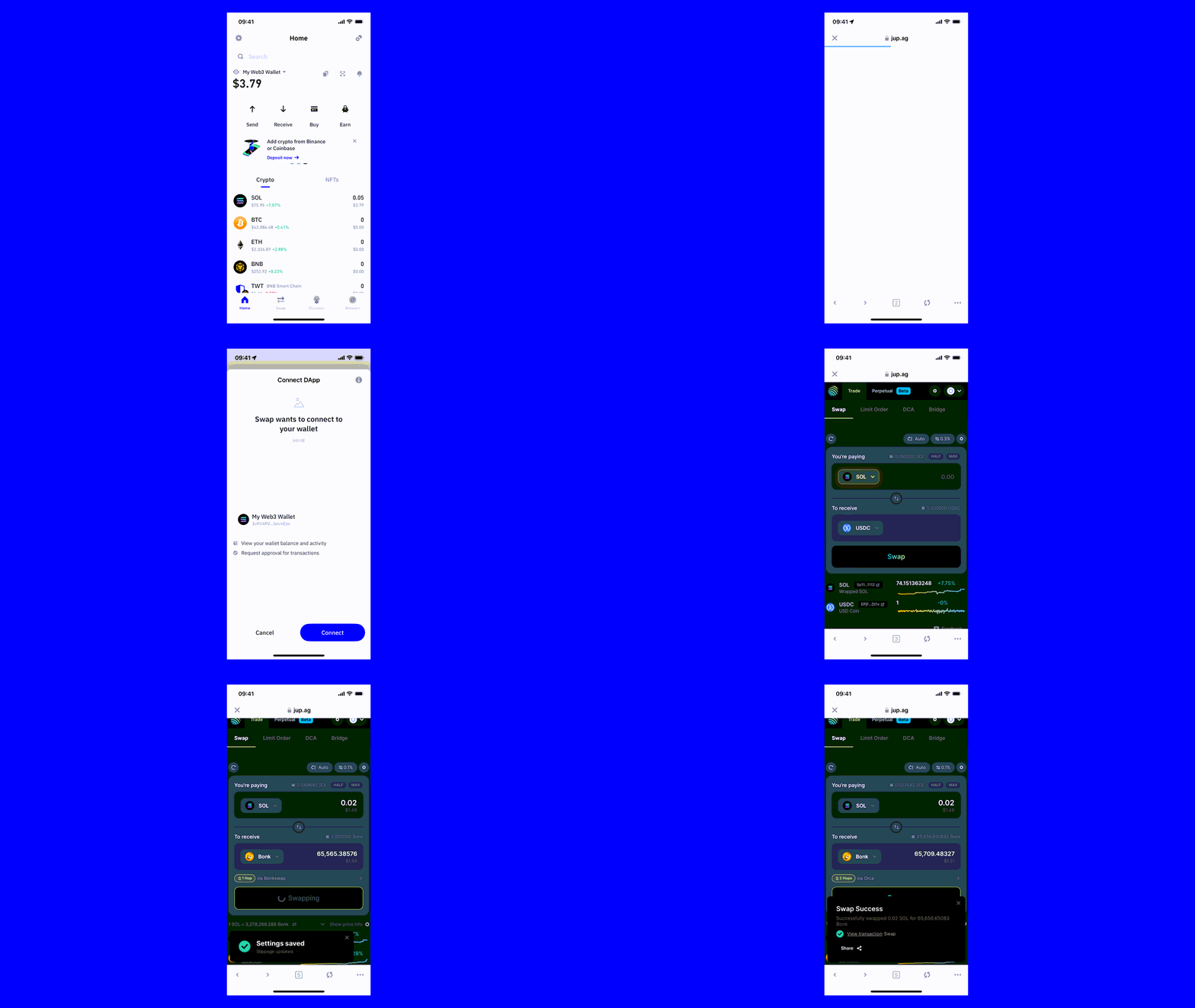
Note: in some cases you may need to adjust your slippage settings to prevent transaction failure.
View your BONK balance in Trust Wallet
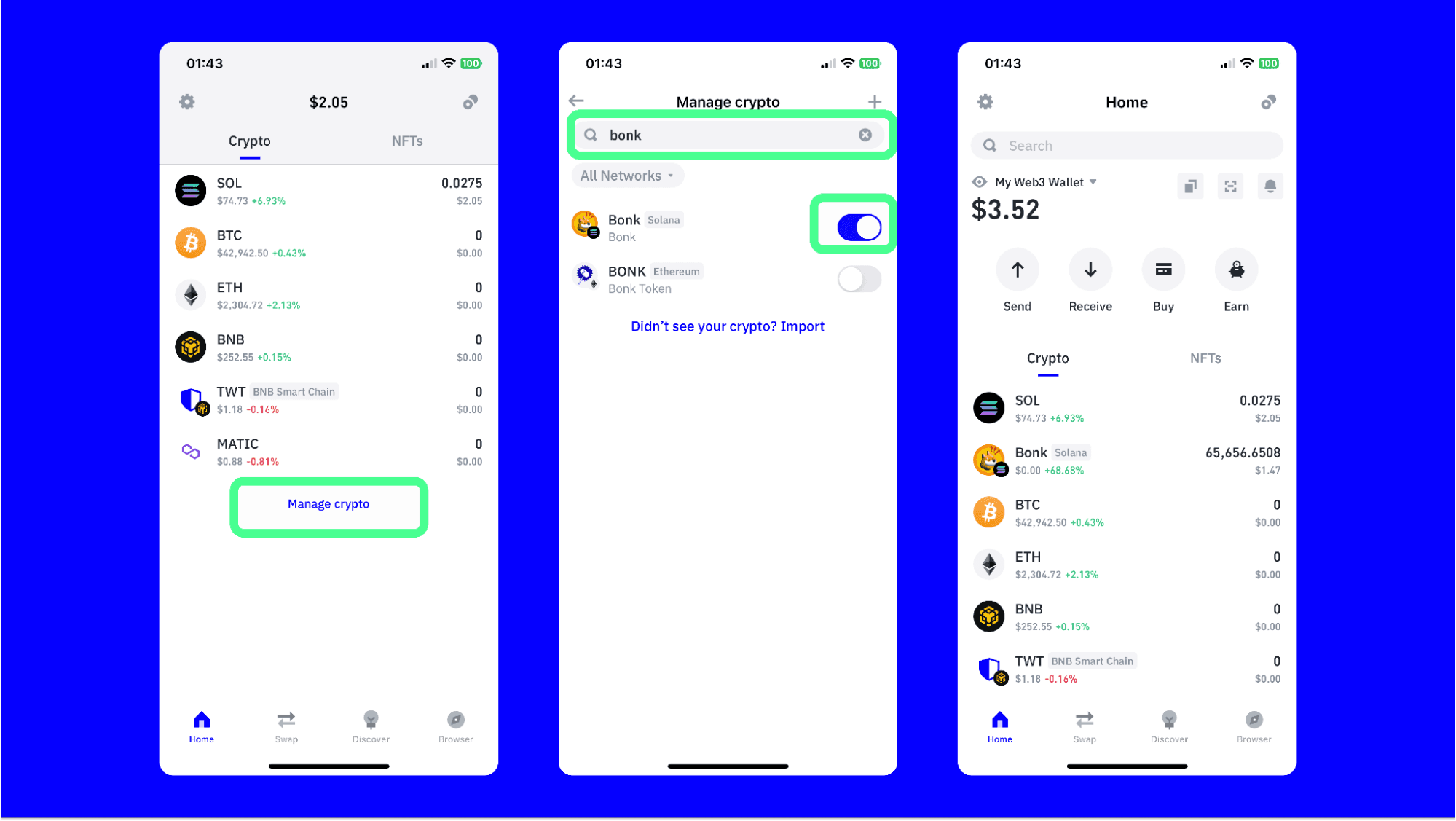
To ensure you can see your BONK tokens, do the following:
Scroll down on the home screen until you see “Manage crypto” and select it.
Search for “BONK”. Then switch the toggle for Bonk to on (so it turns blue).
Navigate back to the home screen of your wallet and you’ll see your BONK balance.
Remember that in addition to BONK, Trust Wallet lets you manage and interact with 10M+ crypto assets across ~100 blockchains. Get the latest version of Trust Wallet and explore Web3 without limits.
Join the Trust Wallet community on Telegram Follow us on X (formerly Twitter) Instagram Facebook Reddit
Note: Any cited numbers, figures, or illustrations are reported at the time of writing, and are subject to change.