

Cryptocurrency enthusiasts are always on the lookout for efficient ways to manage their digital assets across different blockchain networks. Did you know that you can swap on Base and swap on Solana using Trust Wallet? You get a convenient and user-friendly experience for managing your digital assets across these two popular blockchain ecosystems. Our guide will walk you through the process of swapping tokens between these two innovative blockchain platforms using Trust Wallet, making cross-chain transactions easier than ever before.
Understanding Base and Solana
Before we explore the swapping process, let's briefly explore Base and Solana:
Base is a layer-2 scaling solution built on Ethereum, offering faster and cheaper transactions while maintaining Ethereum's security. It's designed to improve the user experience for decentralized applications (dApps) and DeFi protocols.
Solana is a high-performance blockchain known for its lightning-fast transaction speeds and low fees. It has gained popularity among developers and users alike, particularly in the DeFi and NFT spaces.
Step 1: Create Your Trust Wallet
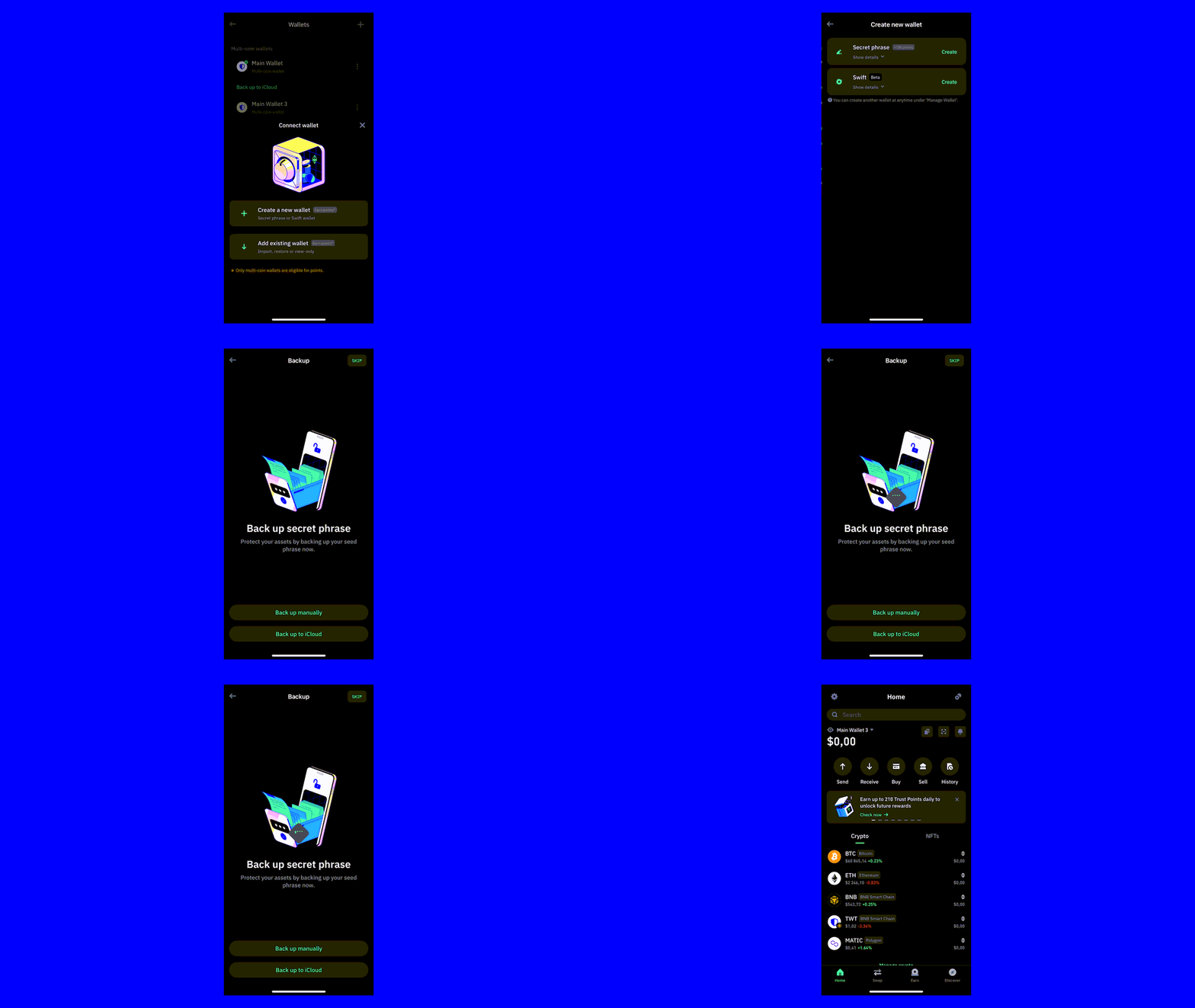
Download the Trust Wallet App, which is compatible with both Android and iOS devices. Here’s a step-by-step guide to help you create your wallet:
- Download Trust Wallet: Visit the Trust Wallet website. Download and install the app.
Create a wallet: Launch the app and select the option to "Create a New Wallet."
Backup your recovery phrase: Trust Wallet will generate a 12-word recovery phrase for you. It's important to write this down and keep it in a secure location.
Confirm your recovery phrase: Verify your recovery phrase by selecting the words in the correct order.
Access your wallet: Now you can securely buy, send, receive, and store cryptocurrencies.
Step 2: Get ETH and SOL for transaction fees
Get ETH to pay Base’s network fees
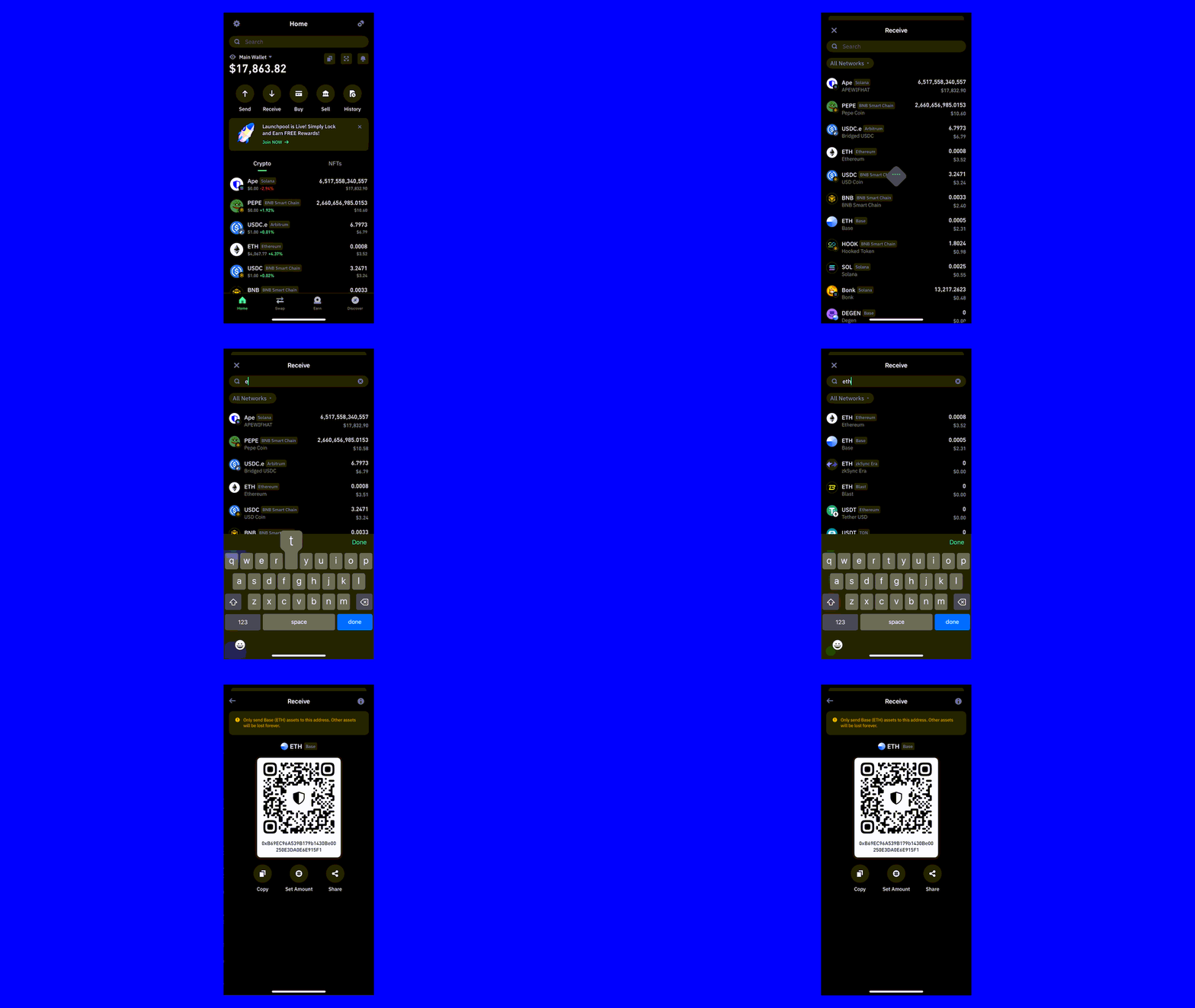
To execute transactions on the Base network, you’ll need Ether (ETH) for gas fees. If you don’t already have ETH on Base, you can deposit ETH (Base) from another wallet or from a centralized exchange. Here’s how:
Select “Receive” from the home screen.
Search for ETH on Base, and select it.
From here you have three options. You can either:
Copy your deposit address and use that on your exchange account or other ETH (Base) wallet to send funds to.
Use the “Deposit from exchange” option to deposit crypto seamlessly from your exchange account.
Buy ETH on Base directly using Trust Wallet.
How to Deposit ETH (Base) Using Trust Wallet
You can easily also deposit ETH (BASE) from another Base wallet or from a centralized exchange, where supported. Here’s how:
Select “Receive” from the home screen.
Search for “ETH” and select ETH on the Base network.
From here you have two options. You can either:
Copy your deposit address and use that on your exchange account or other wallet to send funds to.
Use the “Deposit from exchange” option to deposit crypto from your exchange account.
Get SOL to pay Solana’s network fees
To execute transactions on the Solana network, you’ll need Solana (SOL) for gas fees. If you don’t already have SOL, you can deposit SOL from another wallet or from a centralized exchange. Here’s how:
Select “Receive” from the home screen.
Search for SOL, and select it.
From here you have two options. You can either:
Copy your deposit address and use that on your exchange account or other SOL wallet to send funds to.
Use the “Deposit from exchange” option to deposit crypto seamlessly from your exchange account.
Buy SOL directly using Trust Wallet.
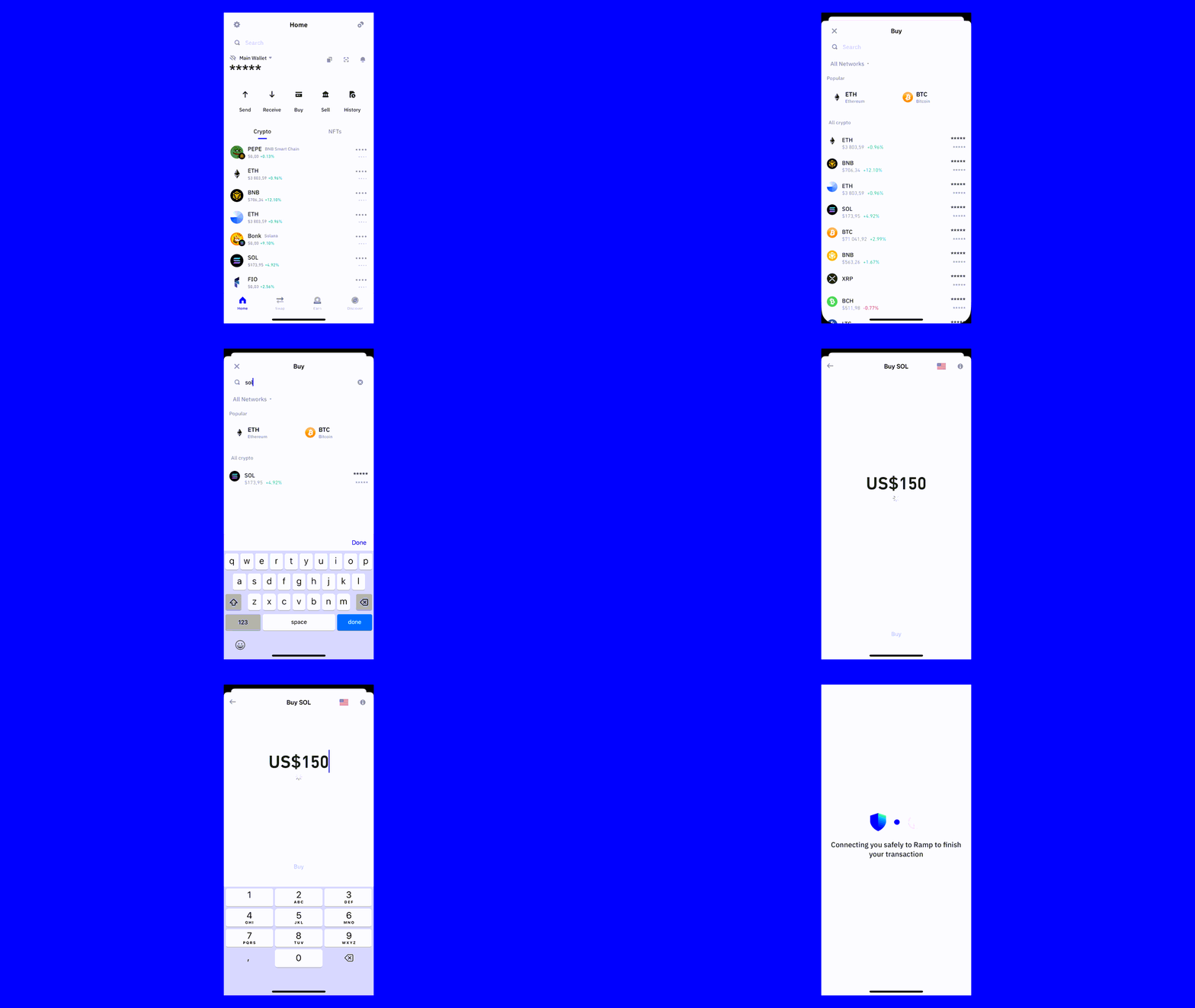
How to Buy SOL Using Trust Wallet
You can buy crypto, including SOL, using Trust Wallet, via our trusted partners. Here’s how:
Select “Buy” from the home screen.
If using the mobile app:
Search for “Solana” or “SOL” and select it.
Choose your preferred currency, then enter the amount of SOL you want to purchase.
Select the third-party provider & payment method you’d like to use.
Select the Buy button and complete the remaining steps.
If using the browser extension:
Choose your preferred currency and amount, then choose Solana (SOL)
Select your preferred third-party provider.
Complete the remaining steps.
Step 3: Swap Tokens Between Base and Solana
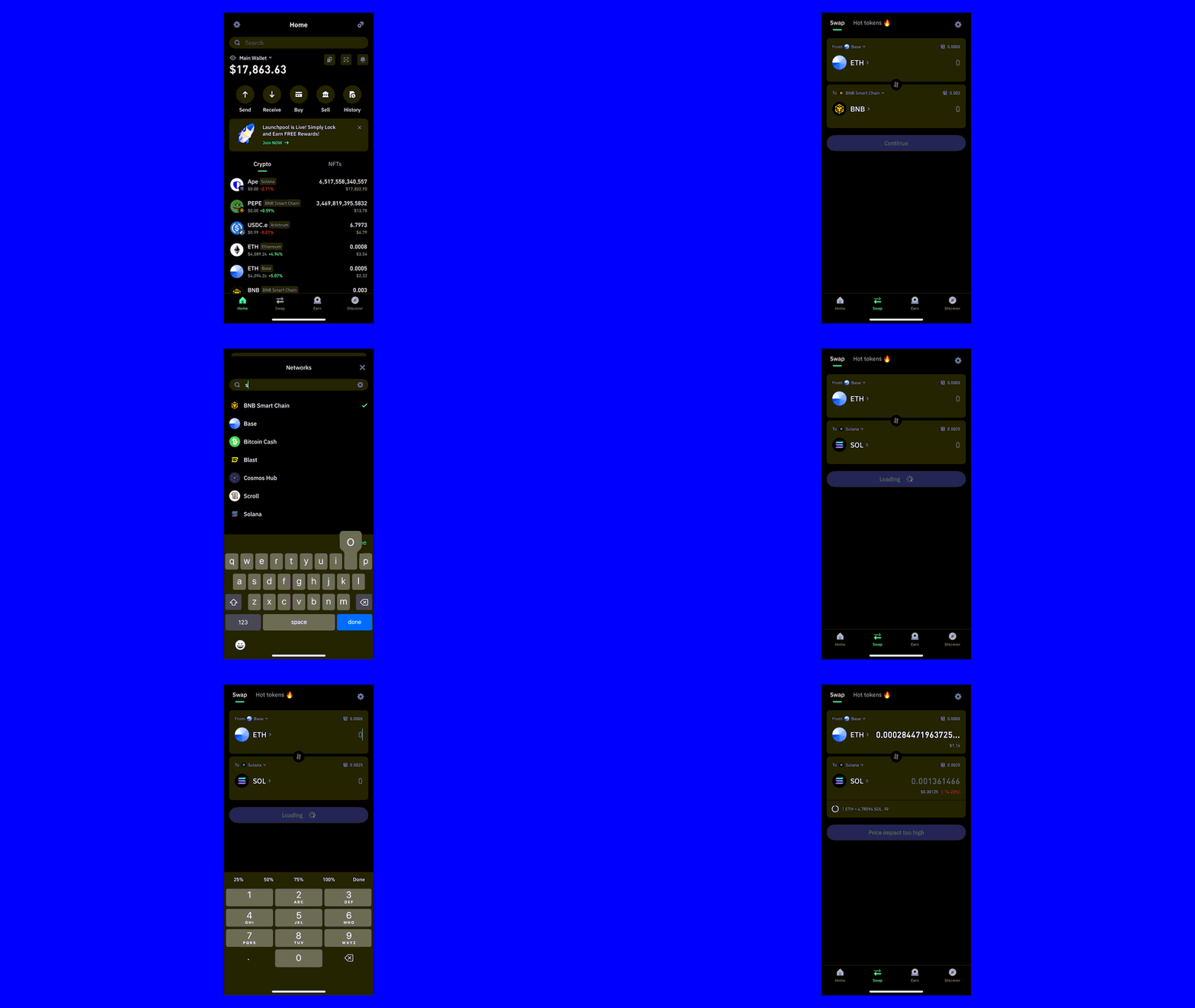
Here’s how to swap tokens between Base and Solana using Trust Wallet:
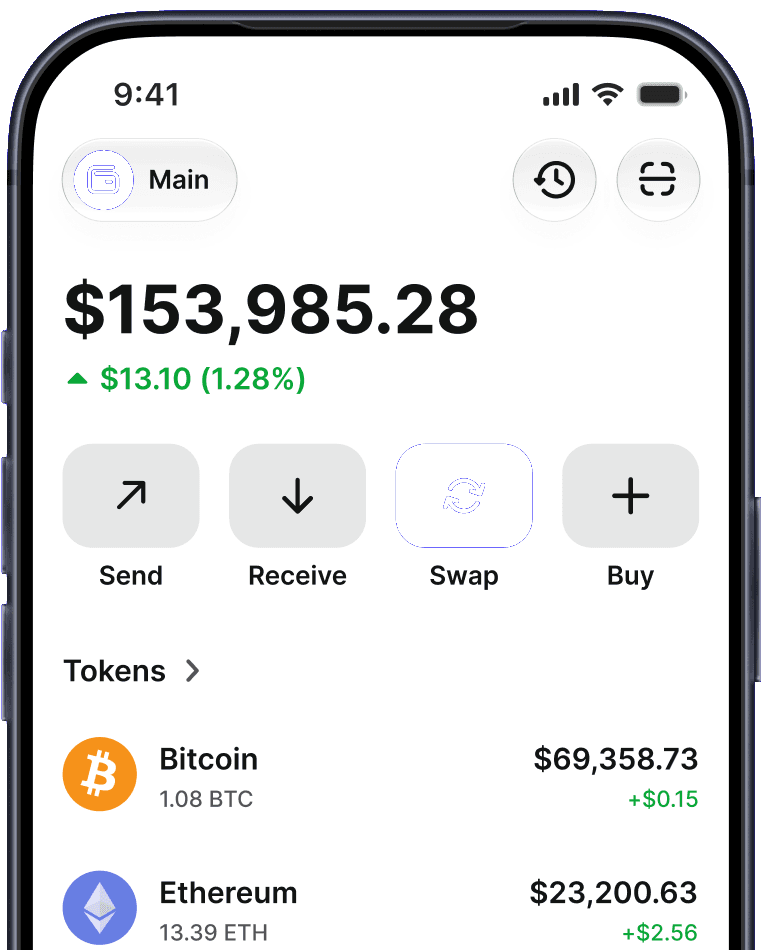
Select “Swap” from the Trust Wallet home screen.
Ensure Base is selected in the the “From” network field, and choose ETH as your token
Ensure Solana is selected in the “To” network field, and choose SOL as your token.
Enter the amount of ETH you would like to swap.
Select “Continue” and complete the remaining steps.
Closing Thoughts
The ability to swap on Base and swap on Solana using Trust Wallet opens up new possibilities for users to explore different blockchain environments and take advantage of unique opportunities in each ecosystem. This cross-chain functionality enhances liquidity across networks and promotes greater adoption of blockchain technology.
As you explore the possibilities of cross-chain swaps, remember to stay informed about the latest developments in the crypto space and always prioritize the security of your digital assets. With tools like Trust Wallet at your disposal, navigating the complex world of multi-chain crypto management has never been easier.
Disclaimer: Content is for informational purposes and not investment advice. Web3 and crypto come with risk. Please do your own research with respect to interacting with any Web3 applications or crypto assets. View our terms of service.
Join the Trust Wallet community on Telegram. Follow us on X (formerly Twitter), Instagram, Facebook, Reddit, Warpcast, and Tiktok
Note: Any cited numbers, figures, or illustrations are reported at the time of writing, and are subject to change.